- Your cart is empty
- Continue Shopping
Instagram 3D Profile Breakout AI Prompt | Ultra Realistic Social Media Photo Edit
- ai prompt, Blog
- Posted on
-
by GraphicsMart
- 0 comments
Instagram 3D Profile Breakout AI Prompt | Ultra Realistic Social Media Photo Edit
Product Description
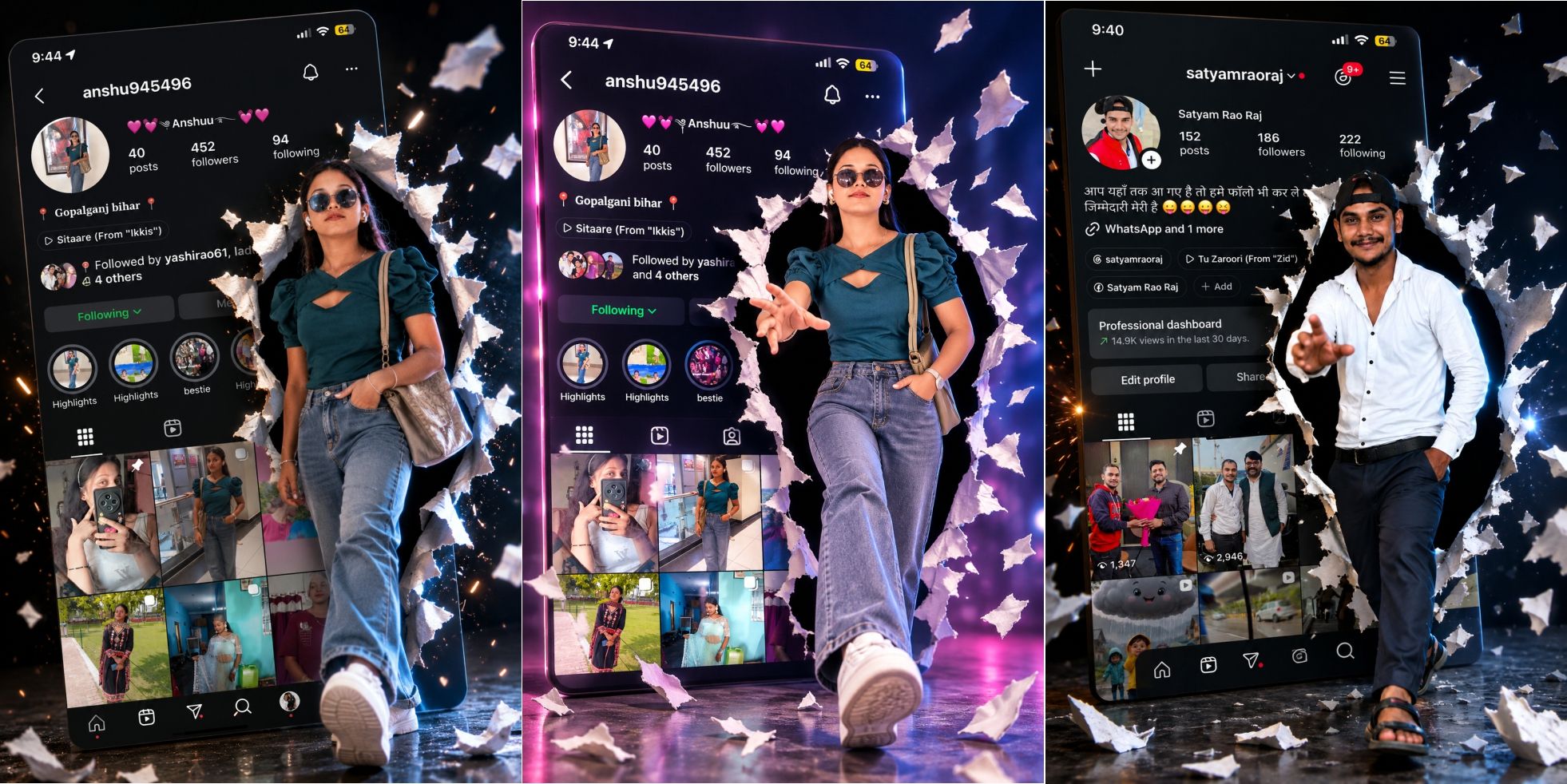
Create stunning viral Instagram-style edits using your own photo and Instagram profile screenshot. This AI prompt generates a hyper-realistic 3D breakout effect where the subject appears to step out of the Instagram profile with cinematic lighting, torn paper effects, glowing particles, and premium social media aesthetics. Perfect for Instagram, Facebook, YouTube thumbnails, portfolio designs, and personal branding.
Product Features
- Ultra Realistic AI Prompt
- Detailed Negative Prompt Included
- Works with Photo & Instagram Screenshot
- 100% Editable Prompt
- Identity Preservation Instructions
- Cinematic 3D Breakout Effect
- Realistic Torn Paper Effect
- Premium Social Media Artwork
- Hyper Realistic Lighting
- HDR & Volumetric Light Effects
- Dynamic Perspective Composition
- Viral Instagram Style
- 16K UHD Quality Output
- High Detail Face & Skin Texture
- Luxury Color Grading
- Photorealistic Results
- Beginner Friendly Prompt
- Compatible with Multiple AI Models
- Instant Digital Download
- Commercial Use Friendly
Compatible AI Models
- ChatGPT Image
- Google Gemini
- Midjourney
- FLUX.1
- FLUX Kontext
- Stable Diffusion XL
- Ideogram
- Leonardo AI
- Recraft AI
Best For
- Instagram DP
- Viral Instagram Posts
- Reels Cover
- YouTube Thumbnail
- Facebook Profile
- Social Media Branding
- Personal Portfolio
- Influencer Profile
- Digital Creator Content
- Professional Photo Editing
✨ AI Image Prompt
Create an ultra-realistic 16K UHD cinematic Instagram profile breakout portrait using two uploaded images.
Image 1: Use it as the person’s reference. Preserve the face, hairstyle, skin tone, body proportions, expression, sunglasses, outfit, accessories, and overall identity exactly as in the uploaded photo with 100% facial identity preservation.
Image 2: Use it as the Instagram profile background. Recreate the uploaded Instagram profile with the same username, profile picture, followers, following, highlights, bio, buttons, reels, photo grid, and overall layout in a clean premium style.
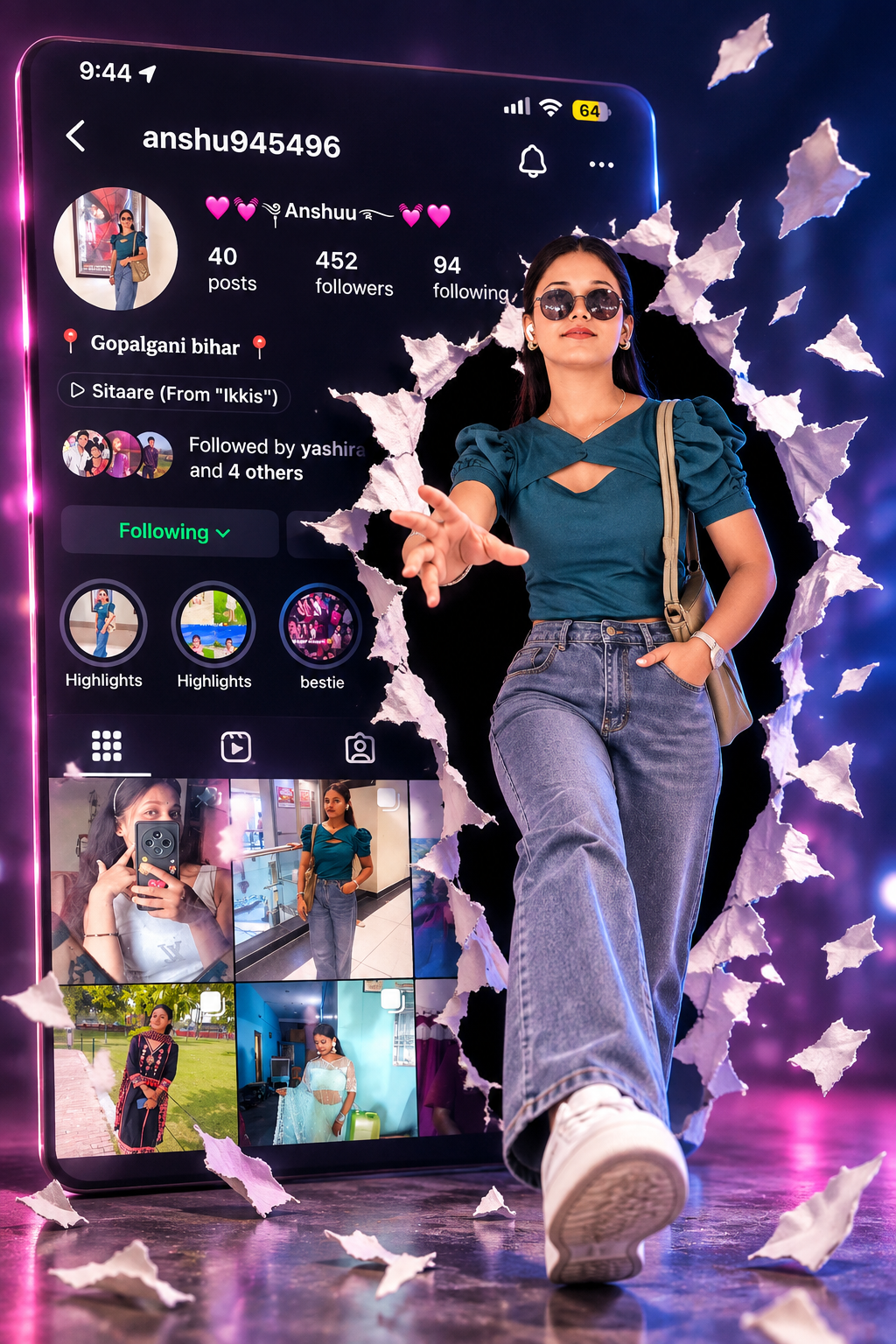
The person is dramatically breaking through the center of the Instagram profile with realistic torn paper and shattered edges, stepping out toward the camera with one hand reaching forward in a confident pose. Add flying paper fragments, glowing particles, cinematic lighting, blue and purple rim lights, HDR reflections, realistic shadows, volumetric light, glossy floor reflections, shallow depth of field, premium social media edit, luxury Instagram artwork, realistic fabric details, photorealistic skin, dynamic perspective, masterpiece composition, ultra detailed, hyper realistic, studio quality, 16K UHD, vibrant colors, trending Instagram edit, viral social media poster.
Negative Prompt:
low quality, blurry, bad anatomy, bad hands, extra fingers, extra arms, extra legs, duplicate person, face distortion, face swap, different face, incorrect skin tone, cropped body, missing limbs, deformed body, watermark, logo, text errors, broken Instagram UI, unrealistic lighting, overexposed, underexposed, noisy image, cartoon, anime, painting, low resolution, pixelated, jpeg artifacts, stretched body, bad perspective, unrealistic shadows, blurry background, ugly face, oversaturated colors
Instagram 3D Breakout Photo कैसे बनाएं? (Step by Step Guide)
यह रहे दोनों के ऑफिशियल लिंक। इन पर टैप करते ही वेबसाइट खुल जाएगी:
ChatGPT
Google Gemini
अगर आप मोबाइल ऐप इस्तेमाल करना चाहते हैं:
इन दोनों में:
- लिंक खोलें।
- Login करें।
- + (New Chat) पर क्लिक करें।
- अपनी Photo और Instagram Screenshot अपलोड करें।
- मैंने जो Prompt दिया है उसे Paste करें।
- Generate पर क्लिक करें।
Step 2: New Chat शुरू करें
एक नई चैट खोलें।
Step 3: दो फोटो अपलोड करें
सबसे पहले ये दोनों इमेज अपलोड करें:
✅ Image 1: आपकी HD Photo (जिस व्यक्ति का 3D Effect बनाना है)
✅ Image 2: Instagram Profile Screenshot
Step 4: Main Prompt पेस्ट करें
जो Main Prompt + Negative Prompt मैंने दिया है, उसे कॉपी करके चैट में पेस्ट करें।
Step 5: यह अतिरिक्त लाइन भी जोड़ें
Use Image 1 as the person's reference.
Use Image 2 as the Instagram profile reference.
Keep the face exactly the same as the uploaded photo.
Do not change the hairstyle, skin tone, facial features, or outfit.
Maintain the same Instagram username, profile layout, highlights, followers, and photo grid.
Step 6: Quality Settings लिखें
Prompt के अंत में यह भी जोड़ें:
Aspect Ratio 4:5
Ultra Realistic
HDR
Photorealistic
16K UHD
Studio Lighting
Volumetric Lighting
Masterpiece
Highest Quality
Sharp Focus
Step 7: Generate करें
अब Generate पर क्लिक करें।
AI 30–60 सेकंड में फोटो बना देगा।
अगर रिज़ल्ट वैसा न आए तो दूसरा Prompt दें
Make the torn paper effect larger.
The person should be stepping completely out of the Instagram profile.
One hand should reach toward the camera.
Increase cinematic lighting.
Add more flying paper pieces.
Add realistic shadows.
Use premium luxury color grading.
Make it look like a professional Photoshop manipulation.
अगर Face बदल जाए
यह लाइन जोड़ें:
Keep the face exactly identical to Image 1.
100% facial identity preservation.
No face modification.
No face swap.
अगर Instagram Screenshot बदल जाए
यह लाइन जोड़ें:
Recreate the uploaded Instagram profile exactly.
Keep the same username, bio, highlights, followers,
 following, profile picture, and photo grid.
Do not redesign the Instagram layout.
सबसे अच्छे रिज़ल्ट के लिए
- ✅ HD फोटो अपलोड करें।
- ✅ Instagram Screenshot साफ़ और पूरा हो।
- ✅ Full Body फोटो का उपयोग करें।
- ✅ Photo और Screenshot दोनों एक ही चैट में अपलोड करें।
- ✅ पहले Prompt दें, फिर Generate करें।
- ✅ यदि ज़रूरत हो तो ऊपर दिए गए सुधार वाले Prompt से दोबारा Generate करें।
इस तरीके से आप हर बार इसी तरह का Premium 3D Instagram Breakout Effect आसानी से बना सकते हैं।
