
- Your cart is empty
- Continue Shopping
5 Trending Raksha Bandhan AI Photo Editing Prompts
- ai prompt, Blog
- Posted on
-
by GraphicsMart
- 0 comments
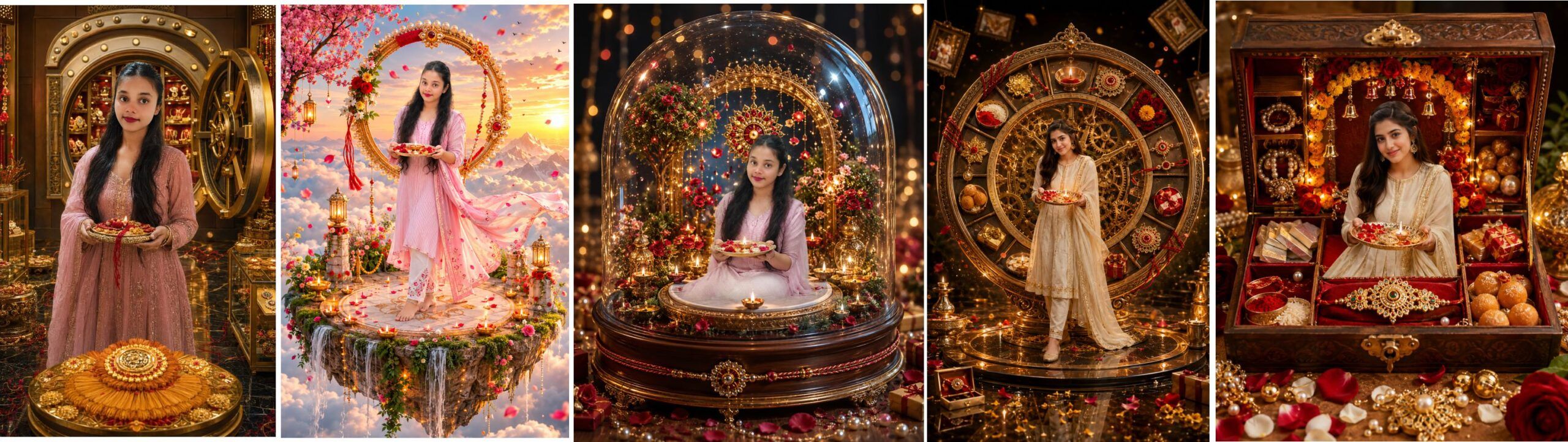
5 Best Raksha Bandhan AI Photo Editing Prompts 2026 | Create Amazing Rakhi Photos
Raksha Bandhan भाई-बहन के प्यार और खूबसूरत यादों का त्योहार है। अगर आप इस Raksha Bandhan अपनी साधारण फोटो को एक शानदार और creative festive photo में बदलना चाहते हैं, तो ये AI prompts आपके काम आ सकते हैं।
इस पोस्ट में हमने 5 अलग-अलग Raksha Bandhan AI Photo Editing Prompts दिए हैं। खास बात यह है कि prompts को इस तरह तैयार किया गया है कि आप एक फोटो या दो फोटो के साथ इन्हें इस्तेमाल कर सकें।
एक फोटो इस्तेमाल करने पर AI को केवल उसी व्यक्ति के साथ solo Raksha Bandhan portrait बनाने का निर्देश मिलता है। दो फोटो देने पर उन्हीं दोनों identities को लेकर brother-sister Raksha Bandhan scene तैयार करने का निर्देश दिया गया है।
हर prompt में face identity preservation, realistic lighting, premium festive decoration और no-extra-person जैसी instructions भी शामिल हैं।
H2 – 1. Luxury Rakhi Memory Box AI Prompt
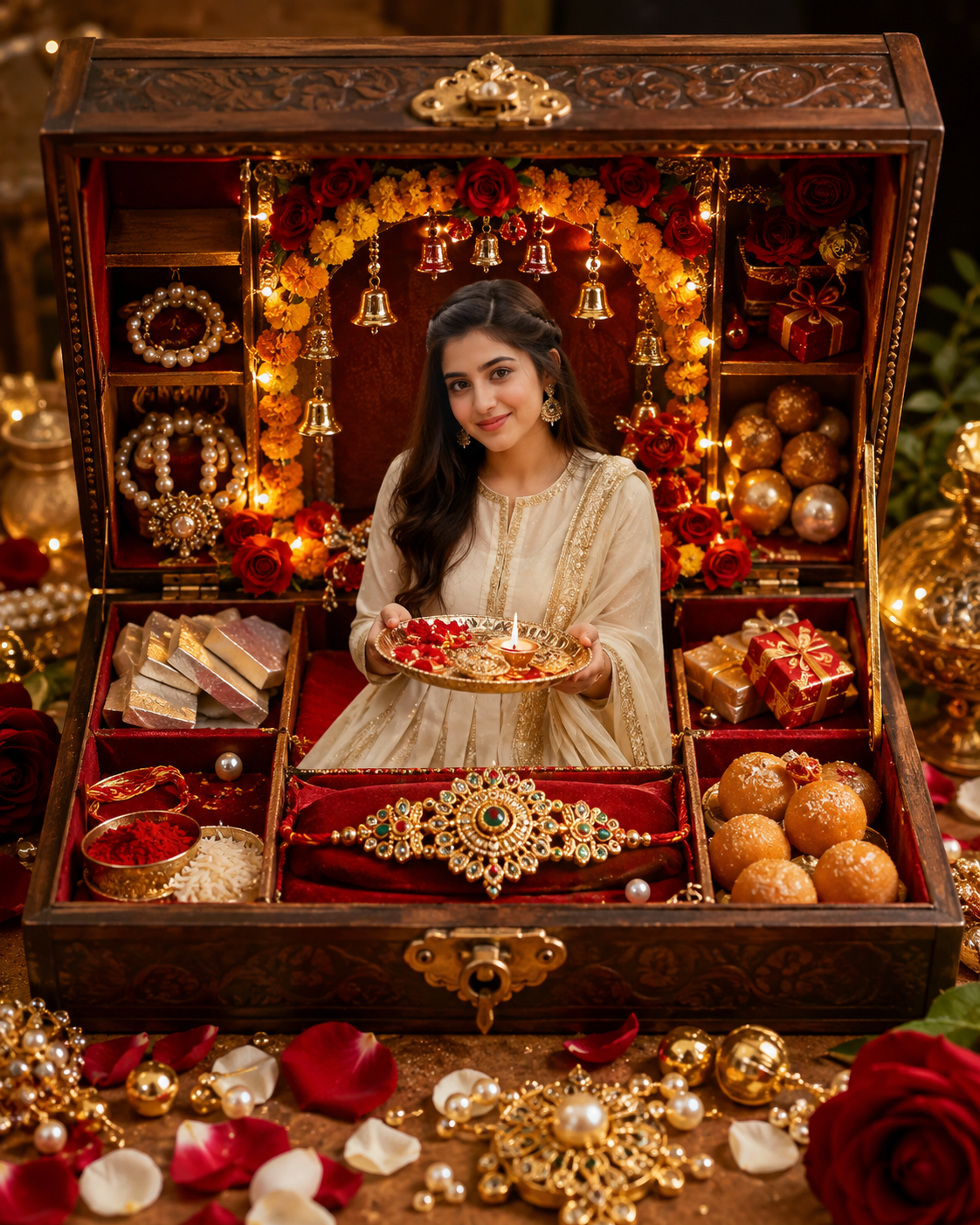
इस concept में Raksha Bandhan celebration को एक शानदार 3D luxury memory box के अंदर दिखाया जाता है। Rakhi, diya, sweets, flowers, pearls और festive decorations इसे premium look देते हैं।
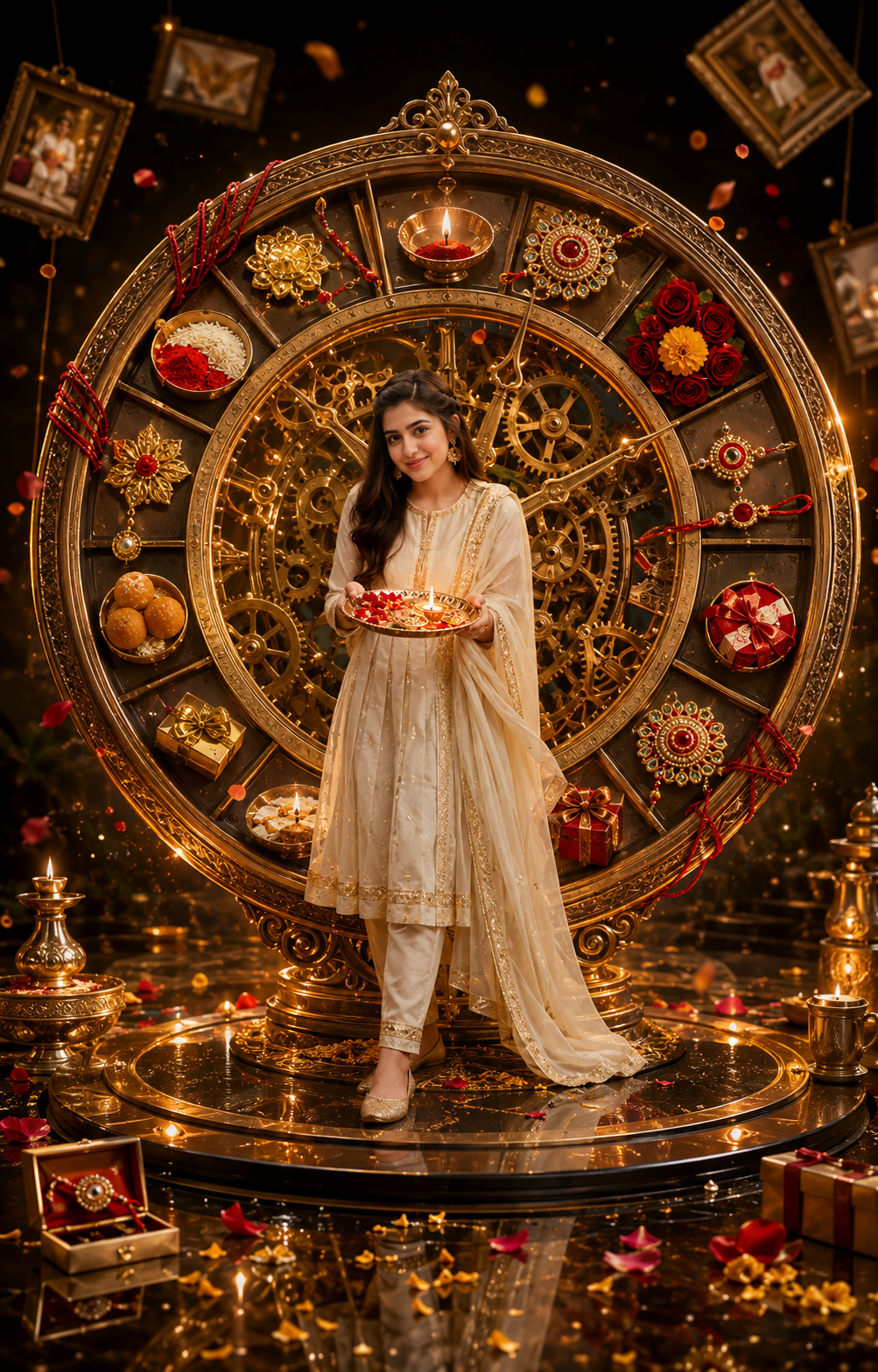
H2 – 2. Giant Rakhi Clock of Memories AI Prompt
यह एक creative cinematic concept है जिसमें विशाल antique clock और Raksha Bandhan elements को मिलाकर unique festive scene तैयार किया जाता है।
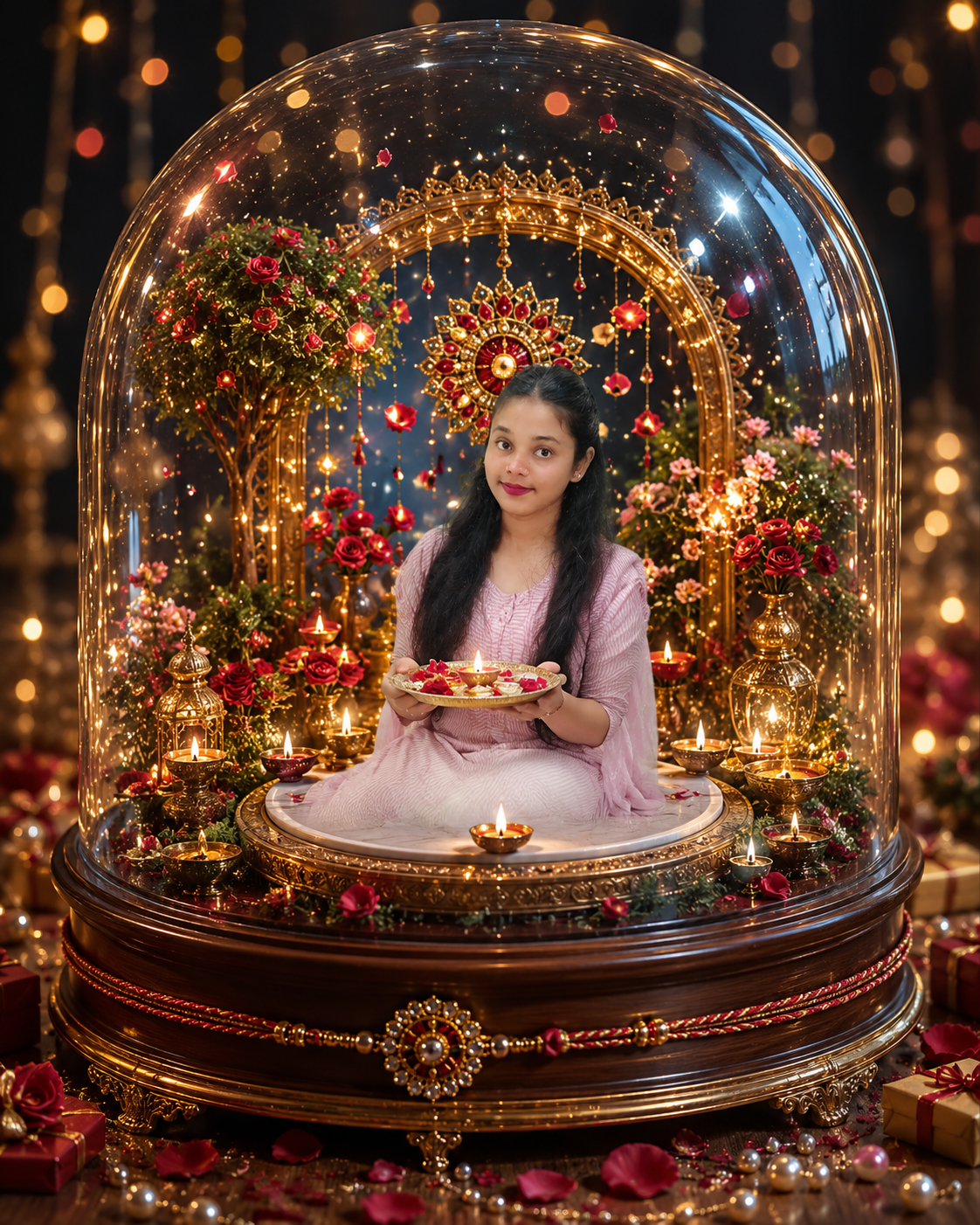
H2 – 3. Magical Rakhi Glass Dome AI Prompt
इस design में subject को एक खूबसूरत luxury glass dome के अंदर miniature festive world के साथ दिखाया जाता है। Golden lights और flower petals इसे magical look देते हैं।
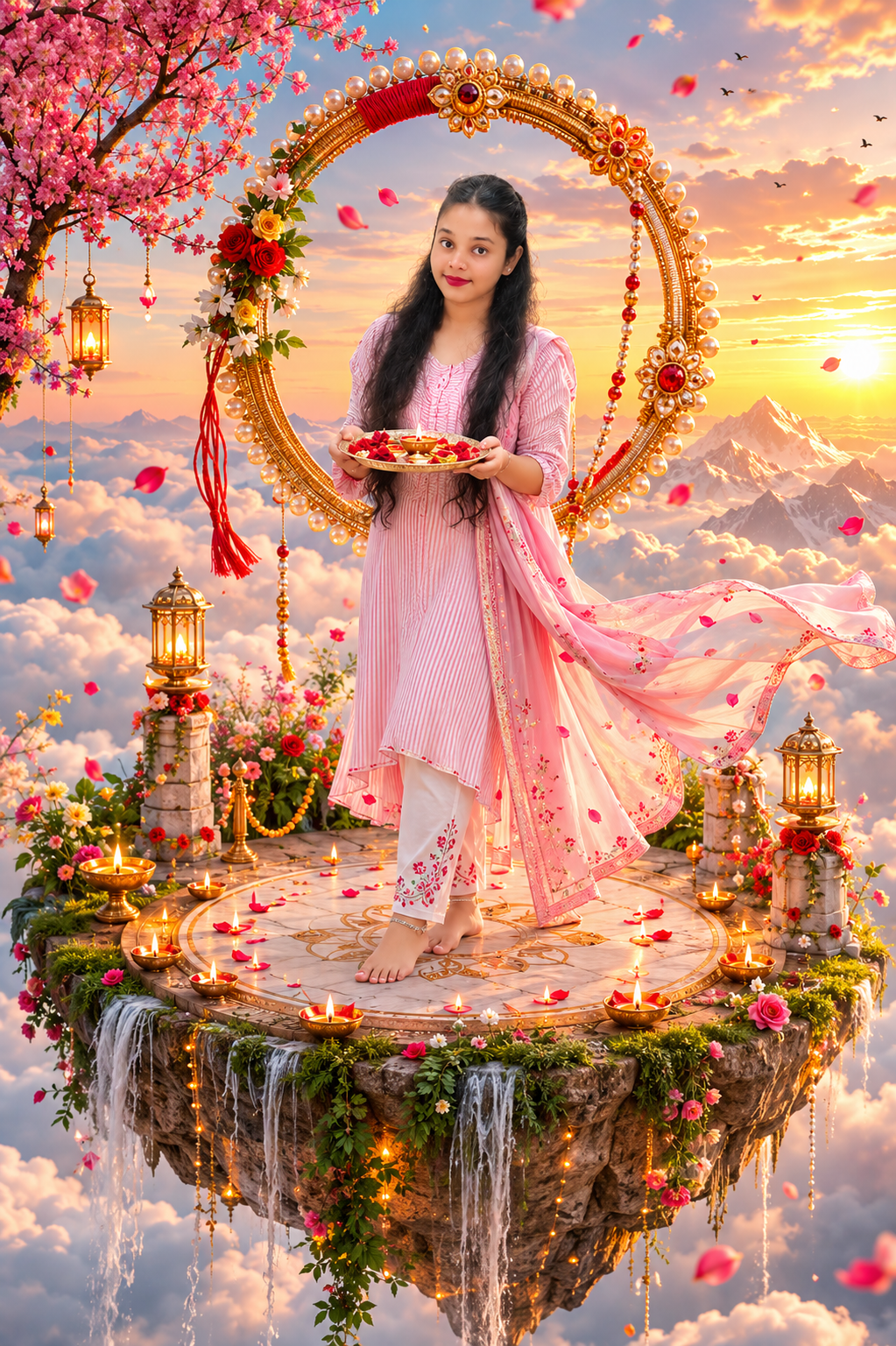
H2 – 4. Floating Rakhi Island AI Prompt
इस concept में Raksha Bandhan celebration को बादलों के ऊपर floating royal garden island पर दिखाया जाता है। Sunrise, clouds, flowers और golden lighting इसे cinematic बनाते हैं।
H2 – 5. Royal Rakhi Jewellery Vault AI Prompt
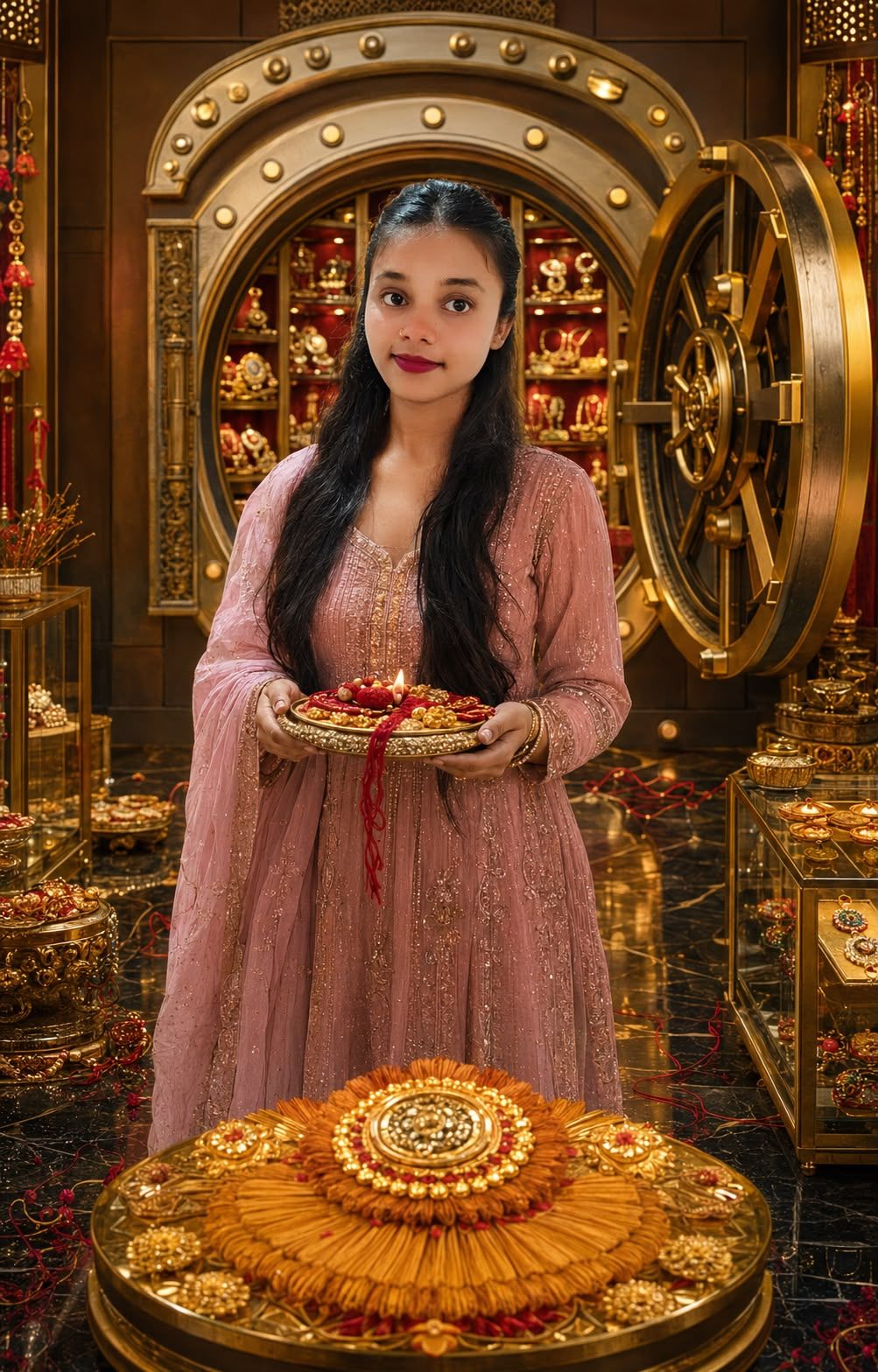
यह high-end luxury concept है जिसमें एक विशाल jewellery vault के अंदर handcrafted rakhis, pearls, diya, sweets और premium festive decorations दिखाई जाती हैं।
✨ AI Image Prompt
PROMPT 4 — FLOATING RAKHI ISLAND ABOVE THE CLOUDS
Create an extraordinary ultra-realistic cinematic vertical 4:5 FLOATING RAKHI ISLAND POSTER using ONE OR TWO UPLOADED PHOTOS.
SMART HUMAN LOGIC
ONE UPLOADED PHOTO:
Use ONLY the uploaded person’s identity and generate exactly ONE human. Show the person standing beautifully on the floating island holding an ornate Rakhi thali. Never generate a brother, sister, companion or background person.
TWO UPLOADED PHOTOS:
Use exactly BOTH uploaded identities and no others. Create an elegant brother-sister Raksha Bandhan moment on the floating island. Show the sister naturally tying or presenting rakhi to her brother.
ULTRA FACE LOCK
Preserve every uploaded face accurately and naturally. Maintain original facial structure, skin complexion, hairstyle, facial hair, eyes, nose, lips and age appearance. Never merge identities.
SPECTACULAR DESIGN
Create a breathtaking small royal Indian garden island floating high above magnificent golden clouds during sunrise.
The island should have realistic rocky edges underneath with tiny waterfalls cascading downward into the clouds.
Create an elegant circular marble platform at the center where the uploaded subject(s) stand.
Surround the platform with marigold flowers, roses, glowing diyas, decorative rakhi patterns, golden lamps and delicate festive arches.
Create a gigantic artistic circular rakhi-inspired ornamental halo floating behind the subject(s), made from gold filigree, pearls and red threads.
Add hundreds of subtle flower petals drifting through the air.
Show distant Himalayan silhouettes emerging above the clouds, spectacular sunrise rays and soft birds extremely far away.
Use rich festive Indian clothing with realistic fabric detail.
Create cinematic golden-hour lighting, volumetric sunlight passing through clouds, realistic atmospheric depth, premium fashion photography and photorealistic skin.
The scene should feel majestic, surreal yet physically realistic.
Keep subject(s) dominant and clearly recognizable.
NO TEXT ANYWHERE.
NEGATIVE PROMPT
extra human, third person, duplicate person, invented sibling, crowd, child, angel, deity, fantasy human, face alteration, blurry face, malformed hands, extra fingers, duplicate limbs, unrealistic waterfall, cartoon clouds, illustration, text, logo, watermark, low resolution, oversaturated skin
✨ AI Image Prompt
PROMPT 3 — RAKHI GLASS DOME MAGICAL WORLD
Create a breathtaking ultra-realistic vertical 4:5 LUXURY RAKSHA BANDHAN GLASS DOME POSTER using ONE OR TWO UPLOADED PHOTOS.
AUTOMATIC INPUT LOGIC
IF ONE PHOTO:
Use exactly ONE uploaded identity. Create exactly ONE human. Place the person naturally inside the giant glass dome holding a beautifully decorated Rakhi thali. Never invent another person or sibling.
IF TWO PHOTOS:
Use exactly BOTH uploaded identities. Create exactly TWO humans inside the dome. Show an elegant natural brother-sister Raksha Bandhan moment. The sister gently presents or ties rakhi to her brother. Never add anyone else.
STRICT IDENTITY PRESERVATION
Maintain the exact recognizable identity of each uploaded person. Preserve face shape, complexion, hairstyle, eyes, eyebrows, nose, lips, facial hair and natural age. Avoid face replacement or identity mixing.
COMPLETELY UNIQUE SCENE
Create an enormous crystal-clear luxury glass dome resting on a handcrafted dark wooden and golden pedestal.
Inside the dome create a magical miniature Indian festive garden at twilight.
Place the uploaded subject(s) at the center on a small circular marble platform surrounded by glowing diyas.
Create miniature flowering trees, red roses, marigolds, delicate golden arches, tiny lanterns and a beautiful illuminated Rakhi installation behind the subject(s).
Fill the dome with subtle floating golden particles and suspended flower petals, creating a magical snow-globe feeling without snow.
Wrap a luxurious red-and-gold sacred thread decoratively around the wooden base of the dome.
Outside the glass dome create soft out-of-focus festive lights, premium gift boxes and flower petals.
Show realistic curved reflections and refractions on the glass while keeping faces perfectly visible and unobstructed.
Use cinematic midnight-blue and warm golden lighting, elegant rim light around the subjects, realistic shadows, creamy bokeh and extremely detailed premium photography.
Create strong foreground/background depth and an expensive handcrafted collectible appearance.
NO TEXT, NAME, LETTERS, LOGO OR WATERMARK.
NEGATIVE PROMPT
extra people, invented sibling, duplicate subject, crowd, child, faces hidden behind glass reflection, distorted glass face, face swap, changed identity, extra hands, extra fingers, malformed limbs, cartoon, fantasy character, illustration, snow, text, letters, logo, watermark, low resolution, oversaturated colors
✨ AI Image Prompt
PROMPT 2 — GIANT RAKHI CLOCK OF MEMORIES
Create an ultra-realistic cinematic vertical 4:5 “RAKHI CLOCK OF MEMORIES” POSTER using ONE OR TWO UPLOADED PHOTOS.
INTELLIGENT PHOTO LOGIC
ONE PHOTO:
Generate exactly ONE human using only the uploaded identity. Show the uploaded person standing confidently in the center of the giant clock while holding an elegant illuminated Rakhi thali. Do not generate a sibling or any other person.
TWO PHOTOS:
Generate exactly TWO humans using only the uploaded identities. Create a beautiful brother-sister Raksha Bandhan interaction in the center, with the sister naturally tying or presenting rakhi to her brother. No third human.
FACE IDENTITY LOCK
Accurately preserve every uploaded person’s recognizable face, skin tone, facial proportions, hairstyle, eyes, nose, lips, facial hair and age. No face swapping, merging or excessive beautification.
UNIQUE CONCEPT
Create a spectacular gigantic antique golden clock standing vertically inside an elegant dark luxury studio.
Replace conventional clock numerals with beautiful miniature Raksha Bandhan symbols: rakhi, diya, sweets, flowers, gift boxes, roli and rice.
Make the giant clock partially opened like a sophisticated mechanical timepiece, revealing hundreds of intricate golden gears and glowing mechanisms.
Position the uploaded subject(s) inside the center of the clock mechanism on a luxurious circular platform.
Create several small floating memory frames around the clock, but keep them abstract, blurred and WITHOUT additional human faces.
Wrap elegant red sacred threads around portions of the giant clock.
Add marigold petals frozen dramatically in mid-air, glowing dust particles, polished black floor reflections and golden volumetric light.
Use an extraordinary cinematic combination of antique gold, deep burgundy, black and warm amber.
Make the clock monumental and the person(s) the emotional center.
Photorealistic skin, realistic hands, luxury fashion photography, cinematic 85mm lens appearance, dramatic depth.
ABSOLUTELY NO TEXT OR NUMBERS ANYWHERE.
NEGATIVE PROMPT
additional humans, human photographs inside frames, duplicate subject, invented sibling, crowd, child, face distortion, face replacement, extra fingers, bad hands, extra limbs, clock numbers, letters, typography, watermark, logo, cartoon, illustration, low quality, excessive blur, artificial skin
✨ AI Image Prompt
PROMPT 1 — LUXURY RAKHI MEMORY BOX 3D WORLD
Create an ultra-realistic premium vertical 4:5 LUXURY RAKHI MEMORY BOX POSTER using ONE OR TWO UPLOADED PHOTOS.
SMART ONE / TWO PHOTO LOGIC
IF ONE PHOTO IS UPLOADED:
Use exactly ONE uploaded identity and generate exactly ONE human in the entire image. Automatically adapt clothing according to the uploaded person. Show the person elegantly positioned inside the magical Rakhi Memory Box, naturally holding a luxurious Rakhi thali. Never invent a brother, sister, child, companion, crowd or background human.
IF TWO PHOTOS ARE UPLOADED:
Use exactly BOTH uploaded identities and create exactly TWO humans. Create a natural adult brother-sister Raksha Bandhan moment with the sister gently tying or presenting a rakhi to her brother. Never generate a third person.
STRICT FACE LOCK
Preserve each uploaded person’s exact recognizable identity, facial proportions, natural skin tone, eyes, eyebrows, nose, lips, hairstyle, facial hair and age appearance. Never swap, merge or excessively beautify faces.
DESIGN
Create an enormous handcrafted royal wooden keepsake box, opened toward the camera like a magical miniature festival world.
Inside the box create multiple luxurious compartments containing an ornate rakhi, roli-kumkum, rice, glowing diya, kaju katli, laddoo, miniature gift boxes and pearl jewelry.
Place the uploaded subject(s) prominently in the central compartment.
Use deep red velvet lining, antique golden borders, miniature marigold arches, roses, fairy lights and delicate hanging golden bells.
Make several rose petals, pearls and golden decorative elements spill realistically outside the box toward the camera for spectacular 3D depth.
Create warm magical light glowing from inside the box, realistic reflections, cinematic shadows, shallow depth of field, volumetric golden rays and premium advertising photography.
Clothing should be luxurious Indian festive wear in complementary ivory, red and gold tones.
Keep faces large enough, sharp and naturally recognizable.
NO TEXT, LETTERS, LOGO OR WATERMARK ANYWHERE.
NEGATIVE PROMPT
extra person, invented sibling, third human, duplicate human, background people, crowd, child, face swap, merged face, changed identity, distorted face, extra fingers, malformed hands, extra arms, duplicate limbs, blurry face, plastic skin, cartoon, illustration, cheap decoration, flat lighting, low resolution, text, logo, watermark
✨ AI Image Prompt
# PROMPT 5 — ROYAL RAKHI JEWELLERY VAULT
Create an ultra-realistic high-end vertical **4:5 ROYAL RAKHI JEWELLERY VAULT POSTER** using ONE OR TWO UPLOADED PHOTOS.
## ONE OR TWO PHOTO AUTO LOGIC
**ONE PHOTO PROVIDED:**
Generate exactly ONE person using ONLY the uploaded identity. Show the person standing confidently inside the open luxury vault, holding a premium Rakhi presentation tray. Do not invent a sibling or any other human.
**TWO PHOTOS PROVIDED:**
Generate exactly TWO people using ONLY the uploaded identities. Create a sophisticated brother-sister Raksha Bandhan interaction, with the sister naturally tying or presenting an exquisite rakhi to her brother. No additional human.
## STRICT FACE LOCK
Maintain each person’s exact recognizable identity, natural skin tone, facial geometry, eyes, eyebrows, nose, lips, hairstyle, facial hair and age appearance. Do not merge, replace, swap or over-beautify faces.
## NEVER-SEEN LUXURY CONCEPT
Create the interior of a spectacular **royal jewellery vault** with a gigantic circular vault door opened behind the subject(s).
Instead of money, fill the vault with beautifully illuminated Raksha Bandhan treasures.
Create glass display cases containing exquisite handcrafted rakhis, pearls, traditional sweets, ornate thalis, red sacred threads, golden diyas and premium gift boxes.
Create a spectacular central display pedestal shaped subtly like a rakhi medallion.
Place the uploaded subject(s) directly in front of the enormous vault door.
Use polished dark marble flooring with realistic golden reflections.
Decorate the vault architecture with subtle Indian jaali patterns, antique gold details, deep ruby-red velvet panels and tiny warm lights.
Create a few loose red threads and flower petals elegantly leading from the foreground toward the subject(s), creating visual depth.
Use dramatic luxury jewellery-advertisement lighting: focused golden rim lights, soft face lighting, controlled reflections, subtle atmospheric haze and deep cinematic shadows.
Clothing: sophisticated premium Indian festive wear with detailed embroidery but without overpowering the faces.
Make the final image look like an expensive international jewellery campaign combined with authentic Indian Raksha Bandhan emotion.
Ultra-detailed, photorealistic, cinematic 8K appearance, sharp facial details, natural skin texture, realistic hands and premium depth of field.
**STRICTLY NO TEXT, NUMBERS, BRAND, LOGO OR WATERMARK.**
## NEGATIVE PROMPT
money, currency notes, weapons, extra human, invented sibling, duplicate person, crowd, child, face swap, identity change, merged faces, distorted face, extra fingers, malformed hands, extra arms, duplicate body, cheap jewellery, cartoon, illustration, low quality, text, number, logo, watermark
Raksha Bandhan AI Photo बनाने का Step-by-Step तरीका
इन prompts से कोई भी व्यक्ति बहुत आसानी से अपनी 1 फोटो या 2 फोटो लगाकर Raksha Bandhan AI Photo बना सकता है।
Step 1 — AI Tool खोलें
सबसे पहले किसी ऐसे AI image generator को खोलें जिसमें photo upload करके image बनाई जा सके।
आप ChatGPT या Gemini जैसे compatible AI tools का उपयोग कर सकते हैं।
Step 2 — अपनी फोटो तैयार करें
बेहतर result के लिए ऐसी फोटो चुनें जिसमें:
- चेहरा साफ दिखाई दे
- फोटो blurry न हो
- अच्छी lighting हो
- चेहरा ज्यादा ढका हुआ न हो
- front या हल्के side angle वाली फोटो हो
- बहुत ज्यादा filter न लगा हो
Step 3 — अगर सिर्फ 1 फोटो से बनाना है
अगर आप केवल अपनी एक फोटो से Raksha Bandhan design बनाना चाहते हैं, तो:
- अपनी एक clear photo upload करें।
- ऊपर दिए गए 5 prompts में से कोई एक prompt copy करें।
- पूरा prompt AI tool में paste करें।
- Generate button पर click करें।
- AI उसी एक व्यक्ति को लेकर solo Raksha Bandhan photo बनाएगा।
- Prompt में पहले से instruction है कि कोई भाई, बहन या extra person add न किया जाए।
Step 4 — अगर 2 फोटो से भाई-बहन वाला design बनाना है
अगर भाई और बहन की अलग-अलग photos हैं, तो:
- दोनों की clear photos upload करें।
- कोशिश करें कि दोनों photos में face साफ दिखाई दे।
- ऊपर दिए गए prompts में से अपना पसंदीदा prompt copy करें।
- Prompt को AI tool में paste करें।
- Generate करें।
- AI को केवल उन्हीं दोनों uploaded identities से brother-sister Raksha Bandhan scene बनाने का instruction मिलेगा।
Step 5 — सही Prompt चुनें
आप अपनी पसंद के हिसाब से design चुन सकते हैं:
- Memory Box — Premium 3D festive look
- Giant Clock — Creative cinematic look
- Glass Dome — Magical luxury look
- Floating Island — Clouds और sunrise वाला cinematic look
- Jewellery Vault — Royal high-end luxury look
Step 6 — Image Generate करें
Prompt paste करने के बाद image generate करें।
पहली image perfect न आए तो घबराने की जरूरत नहीं है। AI हर generation में थोड़ा अलग result दे सकता है।
2–3 बार generate करने पर अक्सर बेहतर composition मिल जाता है।
Step 7 — Face Check जरूर करें
Image बनने के बाद ध्यान से देखें:
- चेहरा reference photo जैसा है या नहीं
- आंख, नाक और hairstyle सही है या नहीं
- हाथ और उंगलियां ठीक हैं या नहीं
- कोई extra person तो नहीं आया
- दो photos में faces mix तो नहीं हुए
अगर कोई गलती हो, तो वही photo और prompt दोबारा use करें।
Step 8 — Better Result के लिए यह Line Add करें
अगर face सही नहीं आ रहा हो, तो prompt के आखिर में यह line add कर सकते हैं:
“Strictly preserve the uploaded face identity. Do not change facial structure, hairstyle, skin tone, age or recognizable features.”
अगर extra person आ रहा हो तो यह line add करें:
“Generate ONLY the uploaded person/persons. Do not create any additional human, duplicate, child, crowd or background person.”
Step 9 — Final Image Save करें
जब आपको सही result मिल जाए, तो final image save कर लें।
आप इसे:
- WhatsApp Status
- Instagram Post
- Facebook Post
- Profile Photo
- Festival Greeting
- Poster
के लिए इस्तेमाल कर सकते हैं।
आसान तरीका
1 Photo → Upload → Prompt Copy → Paste → Generate
या
2 Photos → दोनों Upload → Prompt Copy → Paste → Generate
बस इतना ही करना है।
Important Tip
अगर दो अलग-अलग photos use कर रहे हैं, तो कोशिश करें कि दोनों photos की lighting और face angle बहुत ज्यादा अलग न हो। इससे AI को दोनों identities सही तरह से preserve करने में मदद मिल सकती है।
