
- Your cart is empty
- Continue Shopping
Ultra Realistic Cinematic Fantasy Double Exposure Portrait Prompt | Enchanted Forest AI Photo | Face Lock 8K
- ai prompt, Blog
- Posted on
-
by GraphicsMart
- 0 comments
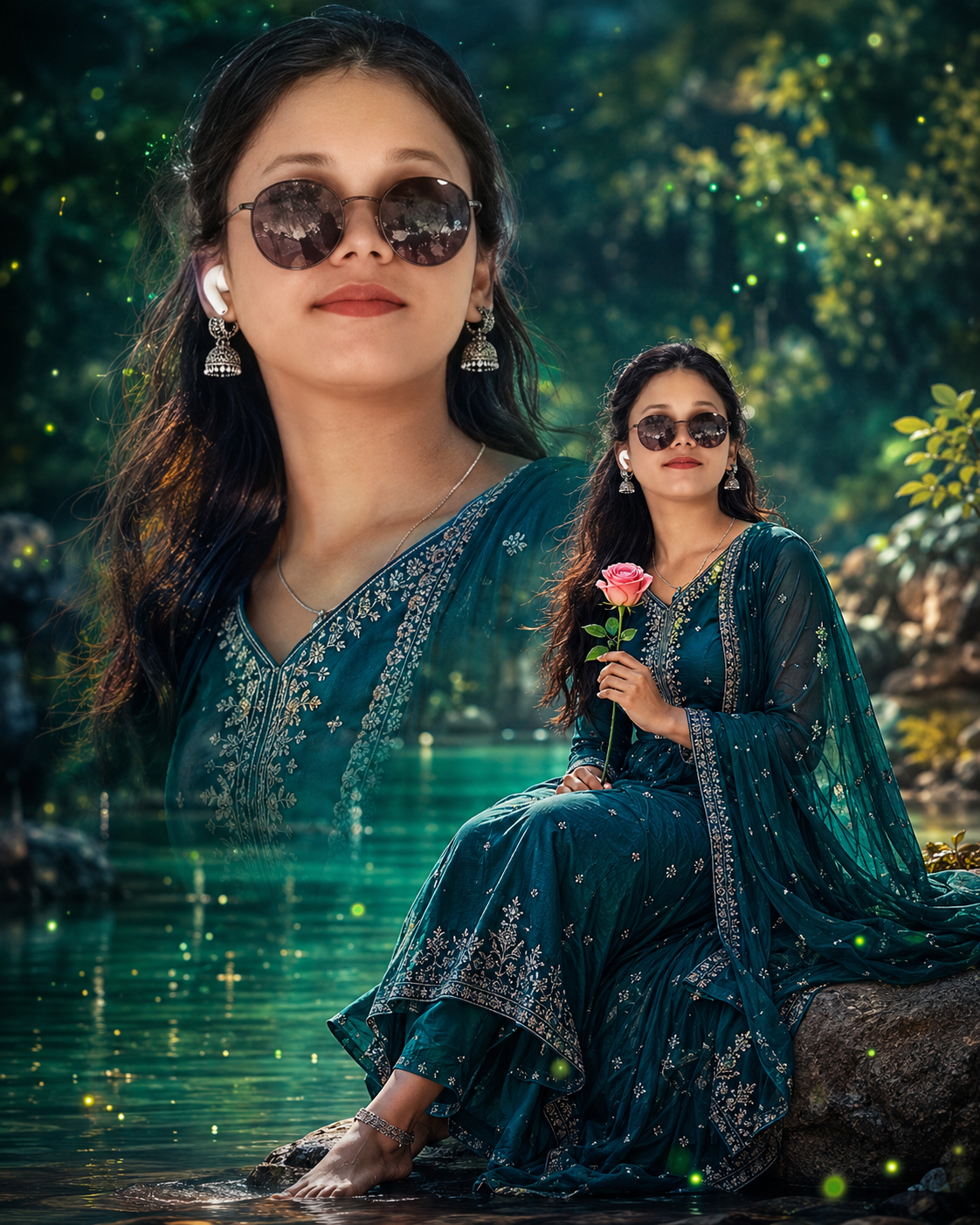
Ultra Realistic Cinematic Fantasy Double Exposure Portrait Prompt | Enchanted Forest AI Photo | Face Lock 8K
Product Description
Create a breathtaking Ultra Realistic Cinematic Fantasy Double Exposure Portrait with this premium AI image generation prompt. Designed for creators, photographers, digital artists, and AI enthusiasts, this prompt transforms any uploaded photo into a magical fantasy masterpiece while preserving the subject’s original facial identity.
The composition features a stunning double exposure effect with a large cinematic close-up portrait and a graceful full-body portrait beside a peaceful emerald-green lake. The enchanted forest setting is filled with glowing fireflies, floating magical particles, lush greenery, dreamy reflections, and soft cinematic lighting that creates a truly fairytale atmosphere.
The subject is dressed in an elegant deep teal embroidered Anarkali suit with intricate silver threadwork, a flowing dupatta, traditional jhumka earrings, and natural makeup. Every detail is optimized for hyper-realistic skin texture, DSLR-quality sharpness, HDR lighting, realistic fabric folds, premium color grading, and ultra-detailed 8K–12K output.
A powerful Face Lock instruction ensures the uploaded person’s facial identity remains unchanged, making it perfect for personalized AI portraits. The package also includes a professional negative prompt to reduce unwanted artifacts such as blurry faces, distorted hands, extra limbs, low-quality rendering, or face changes.
Whether you’re creating social media content, portfolio artwork, wallpapers, fantasy edits, profile pictures, or professional AI photography, this prompt delivers stunning cinematic results with exceptional realism and magical visual storytelling.
Step-by-Step
- Open your AI Image Generator.
- Upload your photo.
- Paste the Main Prompt.
- Paste the Negative Prompt.
- Select Aspect Ratio 4:5.
- Set quality to HD / Ultra / 8K / 12K.
- Enable Face Reference / Face Lock / Character Reference (if available).
- Generate the image.
✨ AI Image Prompt
Generate an ultra-realistic cinematic fantasy double exposure portrait of the uploaded beautiful woman with naturally wavy long hair, expressive deep brown eyes, flawless glowing skin, and a warm genuine smile. A large close-up portrait of her face dominates the left side of the composition, while a smaller full-body portrait of the same woman on the right shows her gracefully seated beside a calm emerald-green lake, gently holding a pink rose. She wears an elegant deep teal embroidered Anarkali suit with intricate silver threadwork, matching flowing dupatta, traditional jhumka earrings, and subtle natural makeup. The background is a dreamy enchanted forest filled with glowing green firefly lights, soft floating magical particles, lush greenery, and smooth water reflections, creating a serene fairytale atmosphere. Soft diffused cinematic lighting, vibrant emerald and teal color grading, crisp ultra-detailed textures, perfectly sharp focus across the entire image, DSLR quality, hyper-realistic skin, natural facial proportions, premium digital art realism, magical mood, high dynamic range, AR 4:5, 8K. Maintain the face same as the uploaded photo. Aspect ratio 4:5
How to Use This AI Prompt (Step-by-Step Guide)
Step 1: Open Your AI Image Generator
Open your favorite AI image generation website or app that supports image prompts and face reference.
Step 2: Upload Your Photo
Click Upload Image and select the photo you want to transform.
Tip: Use a clear, front-facing, high-resolution image for the best results.
Step 3: Copy the Main Prompt
Copy the Main Prompt provided with this product.
Step 4: Paste the Prompt
Paste the prompt into the AI generator’s Prompt box.
Step 5: Add the Negative Prompt
Copy and paste the Negative Prompt into the Negative Prompt section (if available).
Step 6: Enable Face Lock / Face Reference
If your AI generator supports it, enable one of these options:
- Face Reference
- Character Reference
- Identity Lock
- Face Lock
- Image Reference
This helps keep the uploaded person’s face exactly the same.
Step 7: Select the Aspect Ratio
Choose:
Aspect Ratio: 4:5
Perfect for Instagram posts and portrait images.
Step 8: Choose Image Quality
Set the quality to the highest available.
Recommended:
- HD
- Ultra HD
- 8K
- 12K
Step 9: Generate the Image
Click Generate and wait for the AI to create your fantasy portrait.
step 10: Regenerate (Optional)
If you want a different pose, lighting, or background while keeping the same face, click Generate Again.
Best Results Tips
- ✔ Upload a high-quality photo (1080px or higher)
- ✔ Use a front-facing image with good lighting
- ✔ Avoid blurry or cropped faces
- ✔ Keep only one person in the uploaded photo
- ✔ Use the provided Negative Prompt
- ✔ Enable Face Lock or Character Reference whenever available
- ✔ Generate 2–4 versions and choose the best one
This workflow consistently produces the most realistic cinematic fantasy portraits with the original face preserved.
