- Your cart is empty
- Continue Shopping
Free AI Multi Photo Collage Prompt | Ultra Realistic Face-Preserving Prompt for ChatGPT & Gemini
- ai prompt, Blog
- Posted on
-
by GraphicsMart
- 0 comments
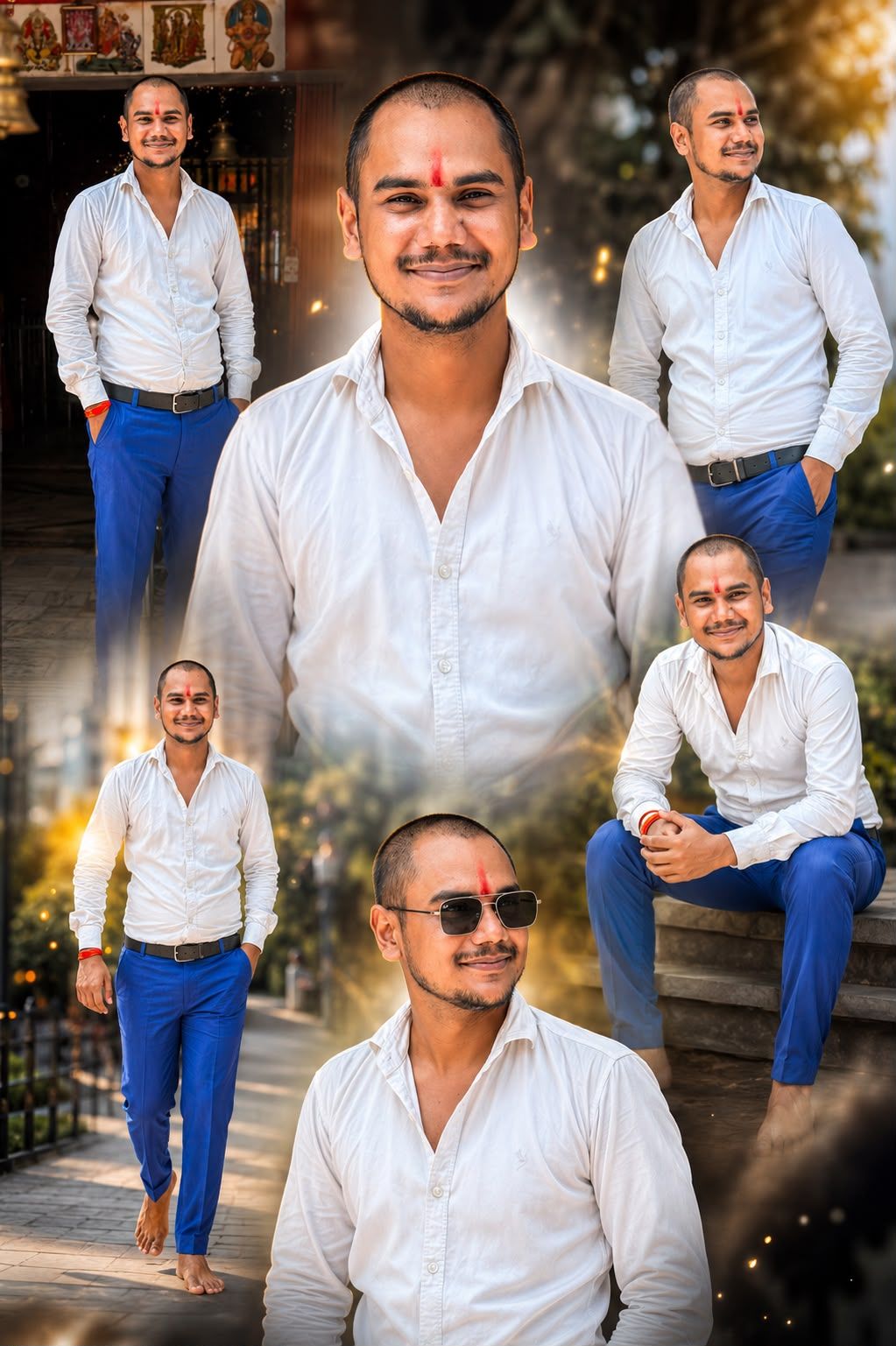
Free AI Multi Photo Collage Prompt | Ultra Realistic Face-Preserving Prompt for ChatGPT & Gemini
Description
Generate stunning AI multi-photo collages from a single uploaded image. This free universal prompt preserves the exact face and identity while creating 6–9 ultra-realistic cinematic portraits with soft shadows, dramatic lighting, and premium 8K quality. Works with ChatGPT, Gemini, Flux, Recraft, Midjourney, and more.
✨ AI Image Prompt
Use the uploaded image as the ONLY face and identity reference. Preserve the exact face, hairstyle, skin tone, facial features, body proportions, age, and identity with extremely high accuracy. Create a premium ultra-realistic cinematic photo collage featuring the same person in 6–9 different stylish poses and camera angles within a single composition. Include close-up, half-body, sitting, standing, walking, and confident portrait shots. Make the center portrait the largest and surround it with smaller artistic portraits. Blend every portrait seamlessly using soft feathered edges, realistic shadows, depth layering, and smooth transitions.
Create a luxury cinematic atmosphere with golden-hour lighting, volumetric light rays, floating dust particles, subtle smoke, glowing bokeh, rim lighting, realistic reflections, soft lens flare, HDR color grading, shallow depth of field, and DSLR-quality sharpness. The background should be elegant and premium, matching the subject’s outfit and mood while keeping the person as the main focus.
Ultra-realistic skin texture, detailed eyes, realistic hair strands, natural facial expressions, photorealistic lighting, 8K resolution, masterpiece, award-winning photography, Canon EOS R5, 85mm f/1.2 lens, ultra HD, hyper realistic, extremely detailed, premium editing, crisp focus.
low quality, blurry, pixelated, low resolution, bad anatomy, deformed body, distorted face, different face, face swap, identity change, cartoon, anime, painting, CGI, plastic skin, unrealistic skin, oversaturated, duplicate face, duplicate body, extra person, extra arms, extra legs, extra fingers, missing fingers, crossed eyes, asymmetrical face, cropped head, cut body, watermark, logo, text, signature, frame, border, noise, artifacts, motion blur, out of focus, poor lighting, ugly, unrealistic shadows, overexposed, underexposed
अगर आप ChatGPT Images, Flux, GPT Image, Recraft या किसी भी AI वेबसाइट पर यह फोटो बनाना चाहते हैं, तो ये स्टेप्स फॉलो करें:
Step 1
AI इमेज वेबसाइट खोलें।
Step 2
Image Reference या Upload Image पर क्लिक करें।
Step 3
अपनी 1 फोटो अपलोड करें।
Step 4
जो Main Prompt + Negative Prompt मैंने दिया है, उसे कॉपी करके Prompt बॉक्स में पेस्ट करें।
Step 5
अगर अलग बॉक्स नहीं है, तो दोनों को एक ही Prompt में रख दें।
Step 6
ये सेटिंग्स रखें (अगर उपलब्ध हों):
* Aspect Ratio: 2:3 या 9:16
* Quality: High / Ultra
* Steps: 30–50
* CFG Scale: 7–9
* Image Count: 4 या 6
* Prompt Strength: 100%
* Image Reference Strength: 80–100%
Step 7
Generate पर क्लिक करें।
अगर चेहरा बदल जाए
तो Main Prompt की शुरुआत में यह लाइन जोड़ दें:
The uploaded image is the only identity reference. Do not change the person’s face, hairstyle, skin tone, age, or facial features. Preserve identity with 100% accuracy across every portrait.
