- Your cart is empty
- Continue Shopping
Luxury Black Suit WhatsApp DP AI Prompt | Trending Cinematic Profile Picture Prompt
- ai prompt, Blog
- Posted on
-
by GraphicsMart
- 0 comments
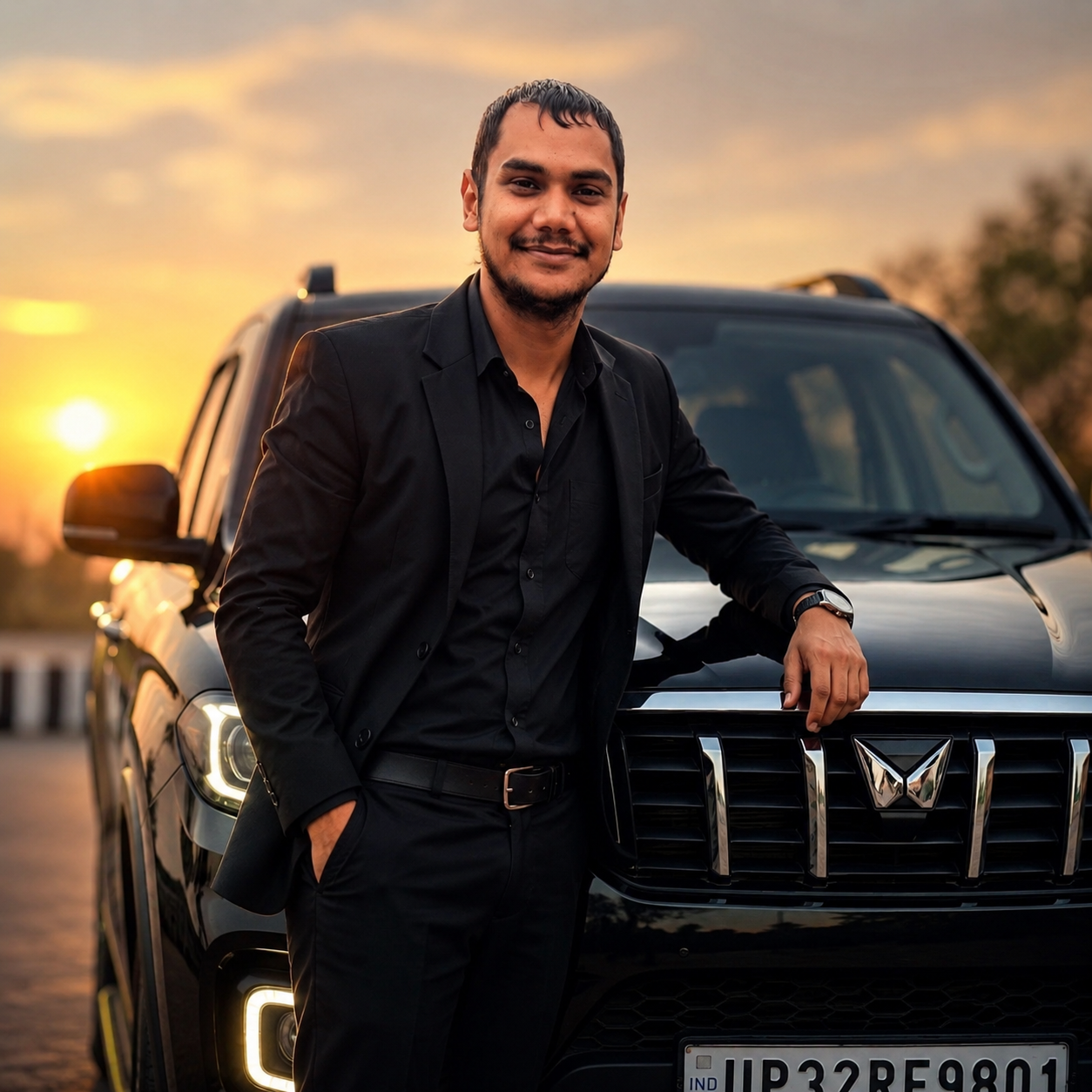
Luxury Black Suit WhatsApp DP AI Prompt | Trending Cinematic Profile Picture Prompt AI की मदद से ट्रेंडिंग WhatsApp DP कैसे बनाएं? (Step-by-Step Guide)
स्टेप 1: अपनी फोटो चुनें
सबसे पहले अपनी एक High Quality और Clear Face वाली फोटो चुनें। फोटो में चेहरा साफ दिखाई देना चाहिए और कोशिश करें कि फोटो धुंधली (Blur) या बहुत अंधेरी (Dark) न हो।
बेहतर रिजल्ट के लिए:
- ✔ चेहरा कैमरे की तरफ हो।
- ✔ केवल एक व्यक्ति फोटो में हो।
- ✔ अच्छी रोशनी (Natural Light) में फोटो ली गई हो।
स्टेप 2: AI Image Generator खोलें
अब किसी भी AI Image Generator वेबसाइट या ऐप को खोलें, जैसे
- ChatGPT Images
- Flux AI
- Midjourney
- Leonardo AI
- Ideogram
- Recraft
स्टेप 3: अपनी फोटो अपलोड करें
AI वेबसाइट में Upload Image या Add Reference Image पर क्लिक करें और अपनी फोटो अपलोड करें।
यह फोटो AI के लिए Reference Photo का काम करेगी।
स्टेप 4: AI Prompt कॉपी करें
इस प्रोडक्ट के साथ दिया गया Premium AI Prompt कॉपी करें।
अब AI वेबसाइट में जाकर Prompt Box में उसे Paste कर दें।
स्टेप 5: Image Generate करें
अब Generate बटन पर क्लिक करें।
कुछ सेकंड में AI आपकी फोटो को एक शानदार Luxury WhatsApp DP में बदल देगा।
आपका चेहरा, Hair Style और पहचान (Identity) वही रहेगी, केवल Outfit, Background और Look बदल जाएगा।
स्टेप 6: फोटो डाउनलोड करें
Image तैयार होने के बाद उसे HD Quality में Download करें।
WhatsApp DP के लिए हमेशा:
- ✔ Square (1:1) Image रखें।
- ✔ चेहरा बीच (Center) में रखें।
- ✔ High Resolution डाउनलोड करें।
बेहतर रिजल्ट के लिए जरूरी टिप्स
✔ High Resolution फोटो अपलोड करें।
✔ चेहरा साफ दिखाई देना चाहिए।
✔ Blur फोटो का उपयोग न करें।
✔ अच्छी Lighting वाली फोटो चुनें।
✔ फोटो में केवल एक व्यक्ति होना चाहिए।
✔ चेहरे को Crop न करें।
✔ Original फोटो जितनी अच्छी होगी, AI Result उतना ही शानदार आएगा।
✔ AI Prompt को बिना बदले इस्तेमाल करें।
महत्वपूर्ण नोट
यह केवल एक AI Prompt File है। इसमें कोई तैयार फोटो नहीं दी जाती।
इस Prompt का उपयोग करने के लिए आपको अपनी फोटो AI वेबसाइट पर अपलोड करनी होगी, फिर Prompt Paste करके Generate बटन पर क्लिक करना होगा। AI आपकी फोटो के आधार पर नई और आकर्षक प्रोफाइल फोटो तैयार करेगा।
प्रो टिप (Website के लिए)
📌 सिर्फ 3 आसान स्टेप में अपनी AI DP बनाएं:
- अपनी फोटो अपलोड करें।
- इस Prompt को Copy करके AI में Paste करें।
- Generate पर क्लिक करें और अपनी Trending WhatsApp DP डाउनलोड करें।
कोई Editing Skill की जरूरत नहीं – सिर्फ कुछ सेकंड में Professional AI Profile Photo तैयार।
✨ AI Image Prompt
Use the uploaded person’s photo as the reference. Preserve the exact face, facial features, hairstyle, beard, eyebrows, skin tone, body proportions, and identity without any changes.
Create a hyper-realistic luxury WhatsApp profile picture of the same person wearing a perfectly tailored premium black suit with a black shirt, luxury wristwatch, stylish black sunglasses, and a premium black round baseball cap.
The person is confidently leaning against a glossy black luxury SUV, with one hand in the pocket and the other resting naturally on the car. Keep a relaxed smile and confident body language.
Background should feature a modern city skyline during golden hour with cinematic sunset lighting, warm orange glow, realistic reflections, luxury atmosphere, soft bokeh lights, shallow depth of field, HDR lighting, volumetric light rays, premium color grading, and dramatic rim lighting.
Camera angle: Eye-level portrait.
Lens: 85mm DSLR.
Aperture: f/1.4.
Ultra-sharp focus on the face.
Frame the image in a perfect 1:1 square composition with the face exactly centered so it fits perfectly inside WhatsApp’s circular profile picture. Leave enough margin around the head to avoid cropping.
Photorealistic, ultra-detailed skin texture, realistic beard, natural facial expression, luxury lifestyle, masterpiece quality, 8K resolution, HDR, high contrast, magazine-quality portrait, viral social media profile picture, trending 2026, realistic shadows, premium editing, professional fashion photography.
Do not change the person’s identity, age, hairstyle, beard, or facial structure.
