- Your cart is empty
- Continue Shopping
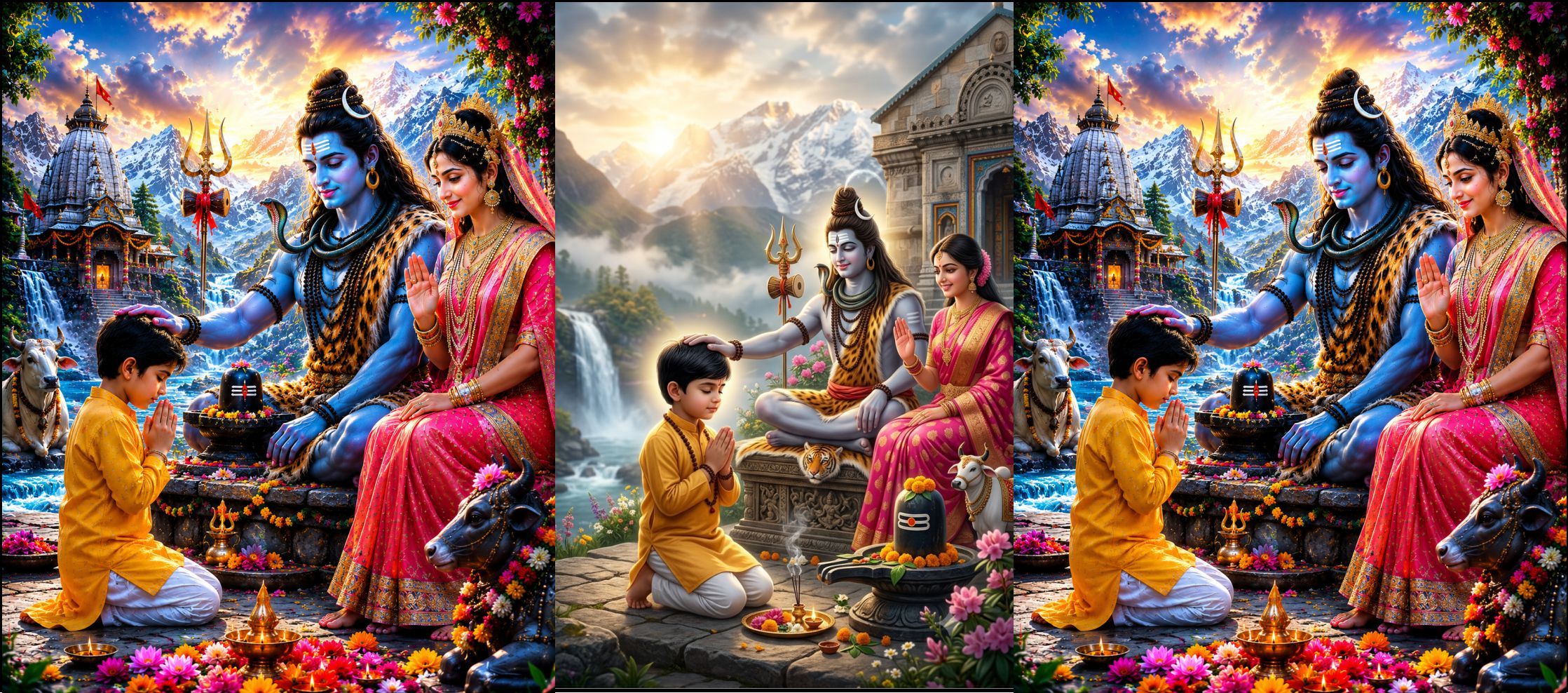
महादेव और माता पार्वती का आशीर्वाद लेते हुए छोटे बच्चे की 8K AI Prompt | Hyper Realistic Devotional Poster
- ai prompt, Blog
- Posted on
-
by GraphicsMart
- 0 comments
महादेव और माता पार्वती का आशीर्वाद लेते हुए छोटे बच्चे की 8K AI Prompt | Hyper Realistic Devotional Poster
Product Description
यदि आप ट्रेंडिंग और भावनात्मक धार्मिक AI इमेज बनाना चाहते हैं, तो यह Mahadev Child Blessing AI Prompt आपके लिए एक शानदार विकल्प है।
इस प्रीमियम Prompt की सहायता से आप ऐसी 8K हाइपर रियलिस्टिक फोटो बना सकते हैं जिसमें एक मासूम भारतीय छोटा बच्चा हाथ जोड़कर भगवान शिव के सामने श्रद्धा से बैठा है। भगवान शिव प्रेमपूर्वक अपना दाहिना हाथ बच्चे के सिर पर रखकर उसे आशीर्वाद दे रहे हैं, जबकि माता पार्वती स्नेह और करुणा के साथ मुस्कुराते हुए बच्चे को अपना दिव्य आशीर्वाद प्रदान कर रही हैं।
दृश्य में बर्फ से ढके हिमालय, भव्य शिव मंदिर, शिवलिंग, नंदी, त्रिशूल, डमरू, बहता हुआ झरना, दीपक, रंग-बिरंगे फूल, सुनहरी सूर्योदय की किरणें, दिव्य प्रकाश और आध्यात्मिक वातावरण दिखाई देता है। पूरी इमेज जीवंत, रंगीन और अत्यंत आकर्षक बनती है।
यह Prompt सोशल मीडिया पोस्ट, इंस्टाग्राम रील, फेसबुक पोस्ट, यूट्यूब थंबनेल, मोबाइल वॉलपेपर, पोस्टर प्रिंटिंग, मंदिर बैनर और धार्मिक डिज़ाइन के लिए एकदम उपयुक्त है।
Product Features
- 8K Ultra HD Quality
- Hyper Realistic Devotional Style
- Vibrant & Colorful Look
- Cinematic Lighting
- Copy & Paste Ready Prompt
- Social Media Ready
- Print Quality Output
- Commercial Use Friendly
- Fully Editable Prompt
- Trending AI Artwork
Compatible AI Tools
- ChatGPT Images
- Gemini AI
- Flux AI
- Midjourney
- Leonardo AI
- Ideogram
- Adobe Firefly
- Recraft AI
- Microsoft Designer
Short Description
भगवान शिव और माता पार्वती का आशीर्वाद लेते हुए छोटे भारतीय बच्चे की 8K हाइपर रियलिस्टिक, रंगीन और सिनेमैटिक धार्मिक फोटो बनाने के लिए प्रीमियम AI Prompt। ChatGPT Images, Gemini, Flux, Midjourney, Leonardo AI, Ideogram और Adobe Firefly के लिए उपयुक्त।
✨ AI Image Prompt
Create an ultra-realistic 8K cinematic devotional poster of a cute young Indian boy kneeling with folded hands in deep devotion while receiving divine blessings from Lord Shiva. Lord Shiva is seated gracefully on a sacred Himalayan stone platform, gently placing His right hand on the boy’s head with a peaceful smile and compassionate expression. Goddess Parvati sits beside Lord Shiva wearing an elegant bright pink and gold saree, smiling lovingly while raising her blessing hand toward the child.
The little boy wears a vibrant saffron-yellow traditional kurta with white pajama, innocent facial expression, neatly combed black hair, eyes closed in prayer, glowing spiritual aura.
The background features majestic snow-covered Himalayan mountains, glowing golden sunrise, ancient Shiva temple, sacred Shivling decorated with colorful flowers, Nandi, Trishul, Damru, crystal-clear waterfalls, sacred river, floating mist, blooming flowers, glowing diyas, incense smoke, divine rays of light, heavenly clouds, birds flying, lush greenery, colorful floral decorations, premium temple architecture, vibrant cinematic atmosphere.
Hyper-realistic skin texture, ultra detailed clothing, realistic fabric folds, premium jewelry, HDR lighting, DSLR photography, 85mm lens, shallow depth of field, volumetric lighting, masterpiece, award-winning digital art, ultra sharp focus, photorealistic, Unreal Engine quality, vibrant colors, luxury color grading, highly detailed hands, realistic anatomy, premium devotional poster, trending spiritual artwork, social media viral quality, 8K UHD, print-ready, no text, no watermark. low quality, blurry, pixelated, watermark, logo, text, signature, cropped body, cut off, duplicate child, extra people, extra fingers, extra hands, extra limbs, deformed anatomy, bad hands, malformed fingers, ugly face, crossed eyes, bad eyes, bad teeth, unrealistic skin, cartoon, anime, 3D render, CGI, plastic face, low detail, oversaturated colors, underexposed, overexposed, noisy image, artifacts, distorted body, poor lighting, messy background, duplicate objects
कैसे इस्तेमाल करें How to Use
AI Prompt इस्तेमाल करने का तरीका
Step 1 – Copy the Prompt
English: Copy the complete Main Prompt from the product page.
हिंदी: सबसे पहले पूरा Main Prompt कॉपी करें।
Step 2 – Open Any AI Image Generator
English: Open ChatGPT Images, Gemini, Flux AI, Midjourney, Leonardo AI, Ideogram, or Adobe Firefly.
हिंदी: अब ChatGPT Images, Gemini, Flux AI, Midjourney, Leonardo AI, Ideogram या Adobe Firefly में से कोई भी AI Image Generator खोलें।
Step 3 – Paste the Prompt
English: Paste the Main Prompt into the prompt box.
हिंदी: Prompt बॉक्स में Main Prompt पेस्ट करें।
Step 4 – Add the Negative Prompt
English: If your AI tool supports a Negative Prompt field, paste the Negative Prompt there. Otherwise, add it below the Main Prompt.
हिंदी: यदि AI Tool में Negative Prompt का अलग बॉक्स है, तो वहाँ पेस्ट करें। यदि नहीं है, तो Main Prompt के नीचे जोड़ दें।
Step 5 – Customize the Character
English: Replace the character description to create your own version.
Examples:
- young Indian boy → little Indian girl
- little Indian boy → teenage boy
- little Indian boy → young woman
- little Indian boy → elderly man
- little Indian boy → mother with child
- little Indian boy → young couple
हिंदी: अपनी पसंद के अनुसार व्यक्ति बदलें।
उदाहरण:
- छोटा लड़का → छोटी लड़की
- छोटा लड़का → किशोर लड़का
- छोटा लड़का → युवा महिला
- छोटा लड़का → बुजुर्ग व्यक्ति
- छोटा लड़का → माँ और बच्चा
- छोटा लड़का → युवा दंपति
Step 6 – Change the Clothing
English: Replace the outfit description.
Examples:
- saffron kurta
- white kurta
- school uniform
- royal sherwani
- casual clothes
- dhoti
- festive traditional wear
हिंदी: कपड़े अपनी पसंद के अनुसार बदलें।
Step 7 – Change the Background
English: Replace the background description.
Examples:
- Kedarnath Temple
- Kailash Mountain
- Himalayan Cave
- Golden Temple Courtyard
- Ancient Shiva Temple
- Forest Temple
- River Ghat
- Divine Palace
हिंदी: बैकग्राउंड अपनी पसंद के अनुसार बदलें।
Step 8 – Change the Camera Style
English: Customize the photography style.
Examples:
- DSLR Photography
- Drone View
- Close-up Portrait
- Wide Angle
- Cinematic Shot
- Low Angle
- Top View
हिंदी: कैमरा एंगल और स्टाइल बदल सकते हैं।
Step 9 – Change the Lighting
English: Replace the lighting style.
Examples:
- Golden Hour
- Sunrise
- Sunset
- Moonlight
- Soft Studio Light
- Divine Glow
- Volumetric Light
हिंदी: लाइटिंग बदलकर नया लुक दें।
Step 10 – Generate the Image
English: Click the Generate button and wait for the AI to create your image. If needed, edit the prompt and regenerate.
हिंदी: Generate पर क्लिक करें। यदि परिणाम मनपसंद न हो, तो Prompt में बदलाव करके दोबारा Generate करें।
Pro Tips
- Change only one or two things at a time (character, clothes, background, lighting) ताकि AI बेहतर परिणाम दे।
- Prompt के अंत में “8K, Hyper Realistic, Ultra Detailed, Cinematic Lighting, HDR” जैसे शब्द रहने दें।
- Negative Prompt हटाएँ नहीं, इससे इमेज की गुणवत्ता बेहतर रहती है।
- अलग-अलग AI मॉडल पर परिणाम थोड़े अलग हो सकते हैं, इसलिए ज़रूरत पड़ने पर Prompt को थोड़ा संशोधित करें।
