
- Your cart is empty
- Continue Shopping
4 Best Raksha Bandhan AI Photo Editing Prompts 2026 | Brother Sister & Solo Photo
- ai prompt, Blog
- Posted on
-
by GraphicsMart
- 0 comments
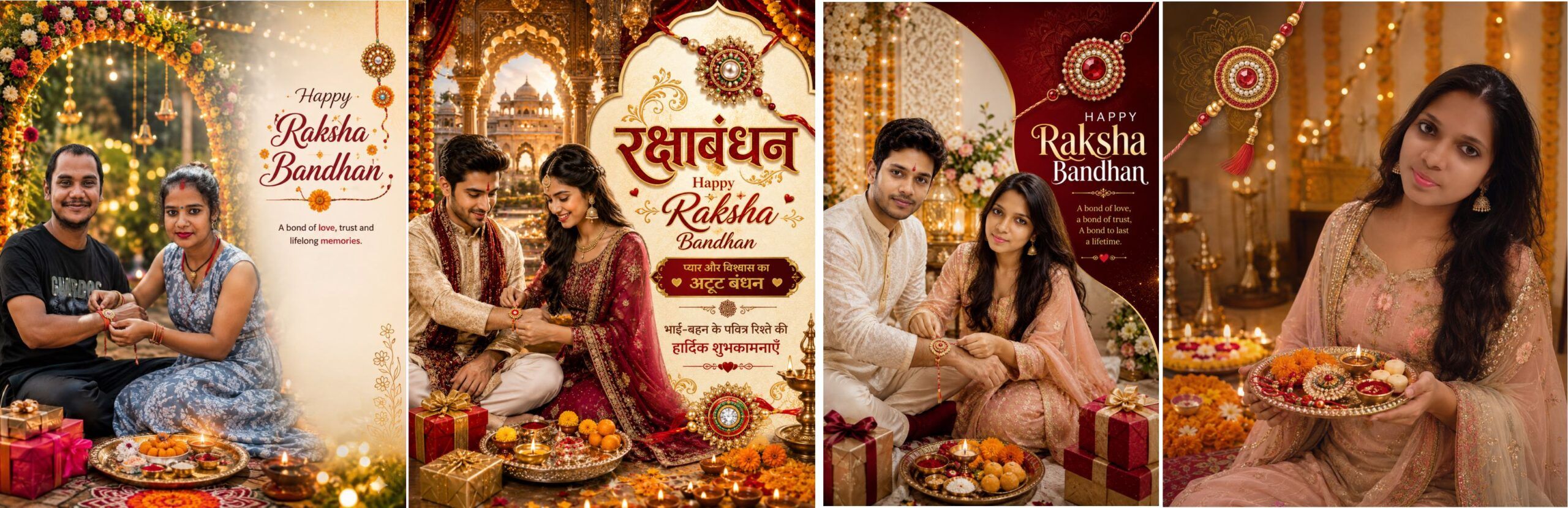
Raksha Bandhan AI Photo Editing Prompts – Create Brother Sister & Solo Rakhi Poster
Description
Create stunning and professional Raksha Bandhan AI Photo Editing Posters using your own photos with these 5 premium AI prompts.
These Raksha Bandhan photo prompts are specially designed to work with both one photo and two photos.
If you upload two photos, you can use one photo of the brother and one photo of the sister. The AI creates a beautiful Raksha Bandhan scene while preserving the recognizable identity of both people.
If you upload only one photo, the prompt creates a solo Raksha Bandhan poster using only the uploaded sister’s photo without automatically adding another person.
The collection includes 5 different trending Raksha Bandhan poster concepts such as Royal Traditional, Cream Floral, Modern Social Media, Royal Palace Golden and Festive Garden designs.
These prompts are ideal for creating Raksha Bandhan Instagram posts, Facebook posts, WhatsApp status images, festival greetings, AI photo edits and personalized Rakhi posters.
Key Features
- 4 different premium Raksha Bandhan AI prompts
- Works with one or two uploaded photos
- Brother + Sister photo support
- Solo Sister photo support
- Face and identity preservation instructions
- Different trending poster concepts
- Premium festive backgrounds
- Social-media-friendly 4:5 format
- Easy to copy and use
- Suitable for ChatGPT and other compatible AI image generators
Create your personalized Raksha Bandhan AI photo in just a few steps and turn ordinary photos into beautiful festive posters.
✨ AI Image Prompt
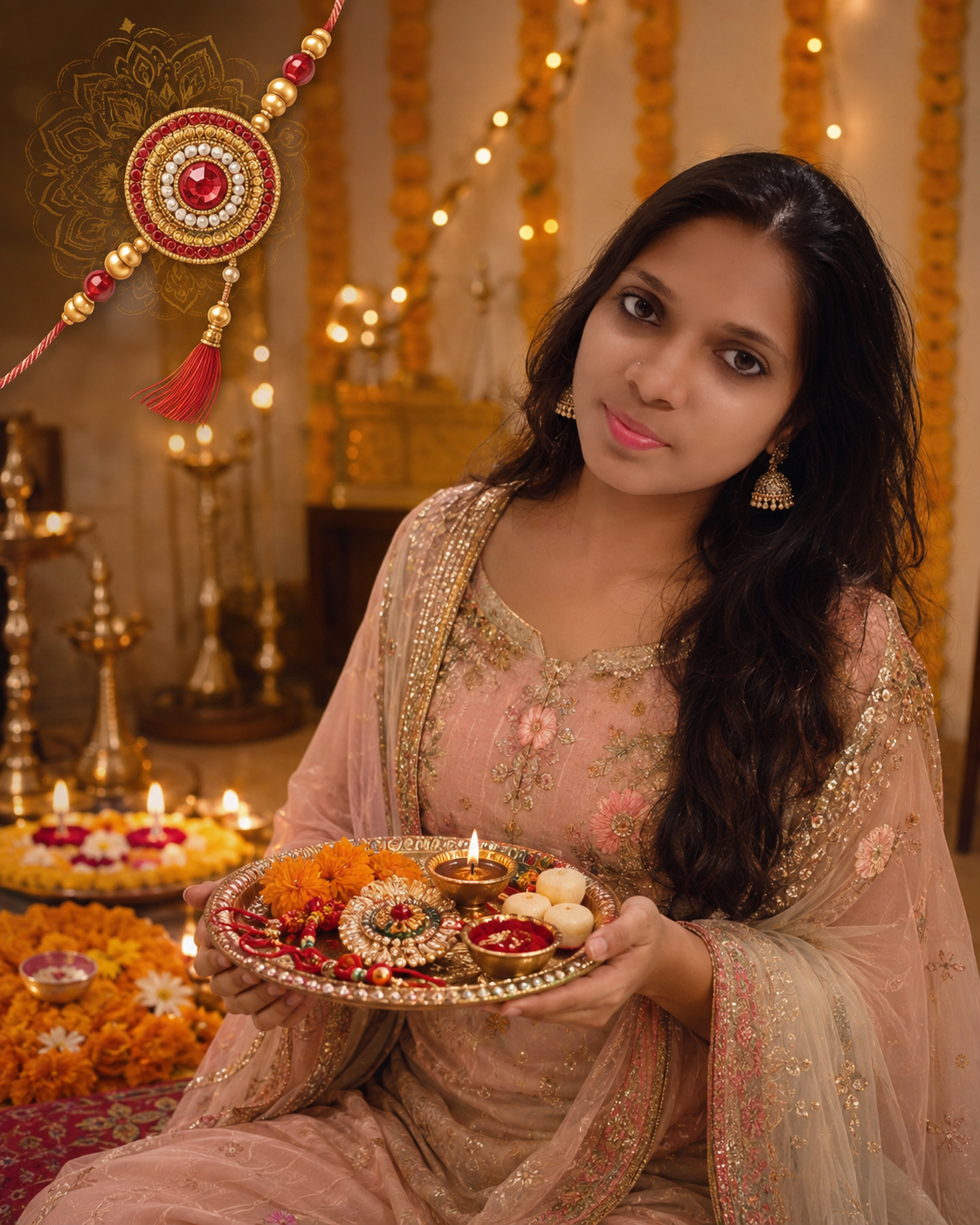
Royal Traditional Rakshabandhan Poster
Create a premium ultra-realistic vertical 4:5 Rakshabandhan festival poster using the UPLOADED PHOTO(S) as exact identity references.
PHOTO INPUT RULE:
If TWO photos are uploaded:
Photo 1 = BROTHER.
Photo 2 = SISTER.
Use both people and preserve their identities independently. Show the sister lovingly tying a rakhi on her brother’s wrist.
If ONLY ONE photo is uploaded:
Treat the uploaded person as the SISTER.
Create a SOLO Rakshabandhan poster featuring ONLY that one uploaded person.
DO NOT generate a brother, second person, background human, second face, silhouette, reflection, or additional human character.
IDENTITY PRESERVATION:
Preserve the exact facial identity, face shape, skin tone, eyes, eyebrows, nose, lips, jawline, hairstyle, age and natural characteristics of every uploaded person. Never swap or blend faces.
CLOTHING:
Change the clothing into premium traditional Indian festive wear. Use elegant embroidery, realistic fabric textures and tasteful jewellery for the sister.
SCENE:
Create a luxurious Indian festive interior decorated with marigold garlands, warm golden fairy lights, diyas, rangoli, flowers and subtle traditional patterns.
TWO-PHOTO COMPOSITION:
Show brother and sister sitting together. The sister is naturally tying an ornate rakhi on her brother’s wrist. Place a beautiful pooja thali containing diya, kumkum, rice, rakhi and sweets nearby. Add elegant gift boxes.
ONE-PHOTO COMPOSITION:
Show ONLY the sister sitting gracefully and holding a beautiful decorated Rakshabandhan pooja thali containing rakhi, diya and sweets. Keep her as the only human subject.
POSTER DESIGN:
Create a clean premium advertising-style composition with enough negative space for adding a festival heading later. Add decorative rakhi artwork as a graphic element.
STYLE:
Ultra-realistic DSLR photography, premium Indian advertising poster, cinematic warm lighting, natural skin texture, realistic hands, rich golden ambience, shallow depth of field, highly detailed, 4K.
IMPORTANT:
One uploaded photo = exactly ONE human.
Two uploaded photos = exactly TWO humans.
Never automatically create missing family members.
NEGATIVE:
extra people, duplicate person, duplicate face, face swap, identity change, extra fingers, malformed hands, distorted rakhi, blurry face, artificial skin, cluttered composition, watermark.
✨ AI Image Prompt
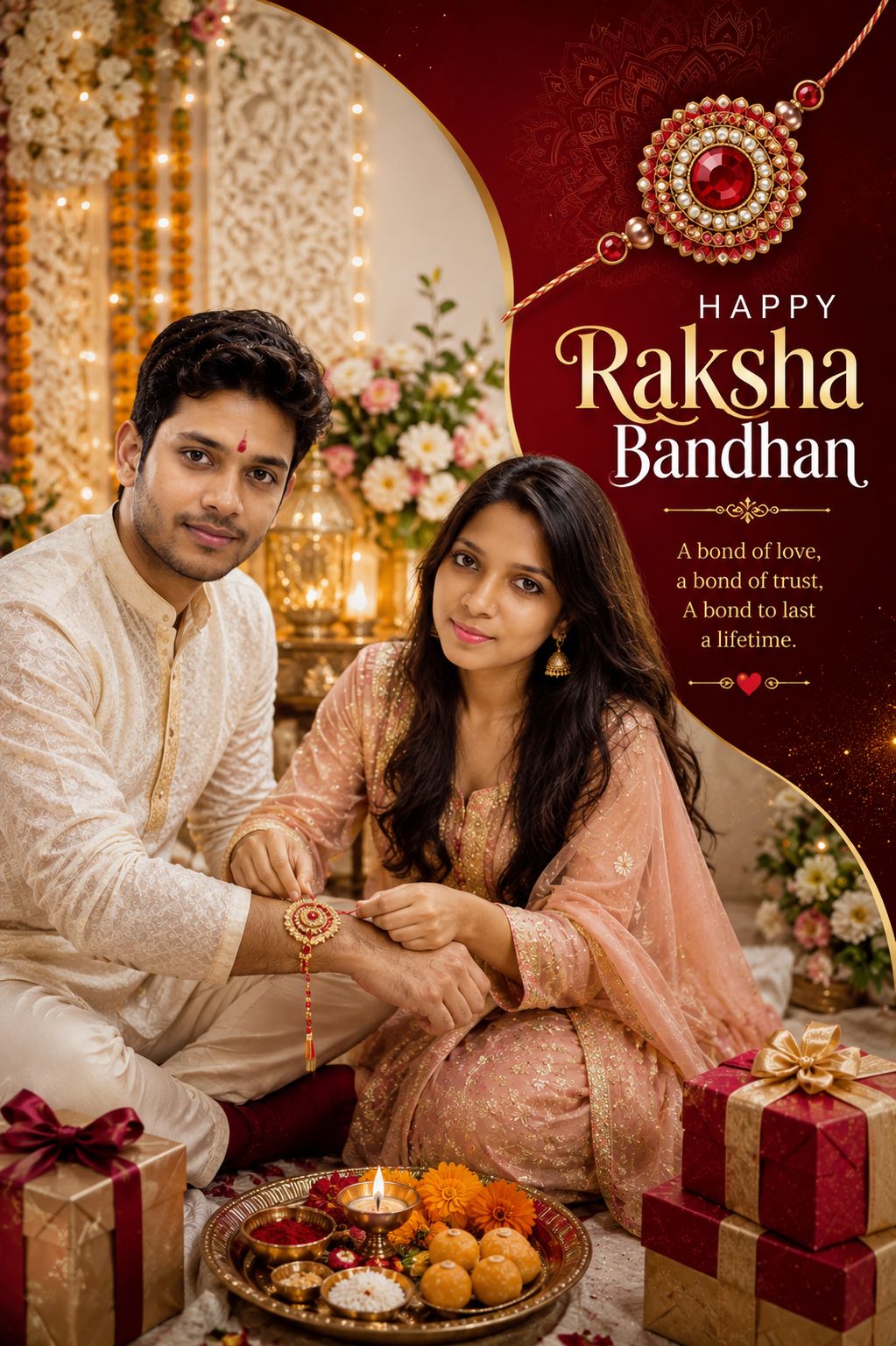
Modern Trending Rakshabandhan Poster
Create a trendy ultra-realistic vertical 4:5 social-media Rakshabandhan poster using the UPLOADED PHOTO(S).
INPUT RULE:
TWO PHOTOS:
Photo 1 = BROTHER.
Photo 2 = SISTER.
Use exactly these two people.
ONE PHOTO:
Treat the uploaded person as the SISTER.
Create a fashionable SOLO Rakshabandhan portrait containing exactly ONE human.
Never create another person.
FACE PRESERVATION:
Preserve the exact identity and recognizable facial characteristics of uploaded subjects. Do not beautify so heavily that identity changes.
VISUAL DESIGN:
Create a modern premium composition using deep red, ivory, saffron and metallic gold accents. Add abstract curved shapes, subtle mandala patterns, glowing particles, decorative rakhi graphics, flowers and premium gift boxes.
TWO-PHOTO VERSION:
Show the sister tying rakhi to her brother in a stylish contemporary Indian festive setup. Both wear fashionable traditional outfits and have natural happy expressions.
ONE-PHOTO VERSION:
Show ONLY the sister in a confident elegant festive portrait. She holds a designer rakhi thali containing diya, rakhi and sweets. Do not show another human anywhere.
LAYOUT:
Place the main subject toward the lower-left or left-center.
Create a large clean typography area on the upper-right for a Rakshabandhan greeting.
Use a decorative oversized rakhi illustration behind the heading area without covering the face.
LIGHTING:
Professional studio-quality festive lighting mixed with warm diya glow, realistic shadows and premium cinematic highlights.
STYLE:
Instagram campaign quality, ultra-realistic photography, modern graphic-design layout, premium advertising aesthetic, crisp details, realistic fabrics, 4K.
STRICT PERSON COUNT:
ONE uploaded photo → ONE person.
TWO uploaded photos → TWO people.
Never add extra humans.
NEGATIVE:
extra people, duplicate bodies, fake brother, duplicate face, identity alteration, bad hands, six fingers, warped jewellery, distorted face, clutter, cheap graphics, watermark. is prompt bhai bahan lagkar banao
✨ AI Image Prompt
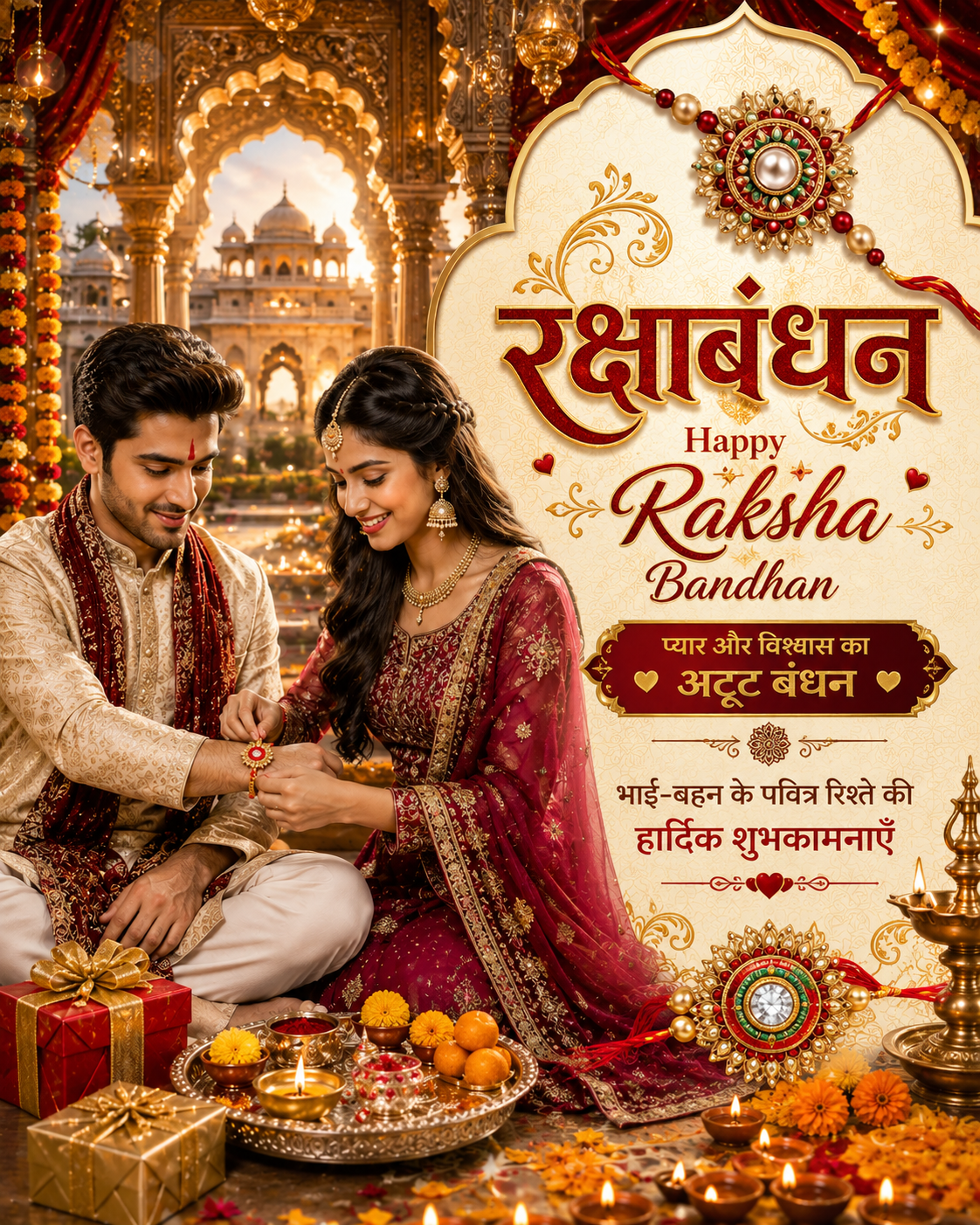
Create a breathtaking ultra-realistic premium vertical 4:5 Royal Indian Raksha Bandhan greeting poster using the TWO UPLOADED PHOTOS as exact identity references.
PHOTO INPUT RULE
Photo 1 = BROTHER
Photo 2 = SISTER
Use exactly these TWO uploaded people in the final poster.
Do NOT generate any third person, background person, child, duplicate face, or additional human.
STRICT IDENTITY PRESERVATION
Preserve the exact recognizable identity of both uploaded people.
Maintain their:
- exact facial structure
- face shape
- natural skin tone
- eyes and eyebrows
- nose and lips
- jawline
- hairstyle
- age appearance
- natural facial characteristics
The brother and sister must clearly look like the people in the uploaded photos.
Never swap their faces. Never merge their identities. Never replace their faces with AI-generated faces.
Their clothes may be completely changed to match the royal festive theme.
BROTHER
Dress the brother in a luxurious cream/off-white embroidered Indian sherwani or kurta-pajama with intricate golden embroidery and a premium deep-maroon stole.
Place him elegantly seated on the left side of the poster.
He should have a natural, warm and happy expression while looking toward his sister and the rakhi ceremony.
SISTER
Dress the sister in an elegant deep maroon/red designer lehenga or premium Indian ethnic outfit with detailed golden embroidery.
Add tasteful traditional jewellery, earrings and naturally styled hair.
Place her beside the brother while she is gently tying a beautiful designer rakhi onto her brother’s wrist.
Her expression should be natural, joyful and affectionate.
RAKHI CEREMONY
Show the sister realistically tying the rakhi around her brother’s wrist.
Hands and fingers must look anatomically correct and natural.
In front of them place a luxurious silver/golden Raksha Bandhan pooja thali containing:
- glowing diya
- kumkum/roli
- rice
- designer rakhi
- marigold flowers
- traditional Indian sweets / laddus
Add elegant red and golden premium gift boxes nearby.
ROYAL PALACE BACKGROUND
Create a magnificent luxurious Indian royal palace interior/courtyard.
Include:
- huge carved golden palace arches
- ornate Indian pillars
- royal architecture
- deep red velvet curtains
- hanging golden lamps
- marigold flower decorations
- rows of glowing diyas
- warm festive fairy lights
- subtle golden bokeh
- decorative traditional floor
- distant palace architecture
Use cinematic warm golden evening lighting to create a rich royal atmosphere.
POSTER COMPOSITION
Create a professionally designed Indian festival advertisement/poster.
Place the brother and sister mainly on the LEFT side.
Reserve approximately 45% of the RIGHT side for a luxurious cream-and-gold royal typography panel.
Decorate the panel with an ornate palace-arch border, subtle traditional Indian patterns and a large premium designer rakhi at the top.
Keep all text clearly separated from the people.
TEXT — DISPLAY EXACTLY
At the top of the royal panel, prominently write:
रक्षाबंधन
Below it write:
Happy Raksha Bandhan
Then create a premium maroon/golden decorative box containing:
प्यार और विश्वास का
अटूट बंधन
Below that write:
भाई-बहन के पवित्र रिश्ते की
हार्दिक शुभकामनाएँ
Make “रक्षाबंधन” the largest Hindi headline.
Use luxurious deep red, maroon and metallic gold typography with elegant festive styling.
Text must be highly readable, properly aligned and professionally spaced.
Do not cover faces, hands or the rakhi ceremony with text.
VISUAL STYLE
Premium Indian festive advertising photography, royal wedding-poster quality, ultra-realistic faces, realistic skin texture, detailed embroidered fabrics, cinematic golden lighting, shallow depth of field, realistic jewellery, professional commercial photography, luxurious red-maroon-cream-gold palette, sophisticated festive atmosphere, highly detailed, HDR, 4K quality.
MANDATORY RULES
Exactly TWO humans only.
Photo 1 must remain the BROTHER.
Photo 2 must remain the SISTER.
Both uploaded identities must remain clearly recognizable.
Do not create additional people anywhere in the palace or background.
Do not change or mix their facial identities.
NEGATIVE PROMPT
extra person, third person, background people, crowd, child, duplicate person, duplicate face, face swap, merged faces, identity change, incorrect gender assignment, deformed hands, extra fingers, missing fingers, malformed wrist, broken anatomy, unnatural rakhi tying pose, distorted face, asymmetrical eyes, plastic skin, excessive beauty filter, blurry face, low resolution, bad jewellery, floating objects, cluttered composition, unreadable typography, random letters, incorrect text placement, watermark, logo.
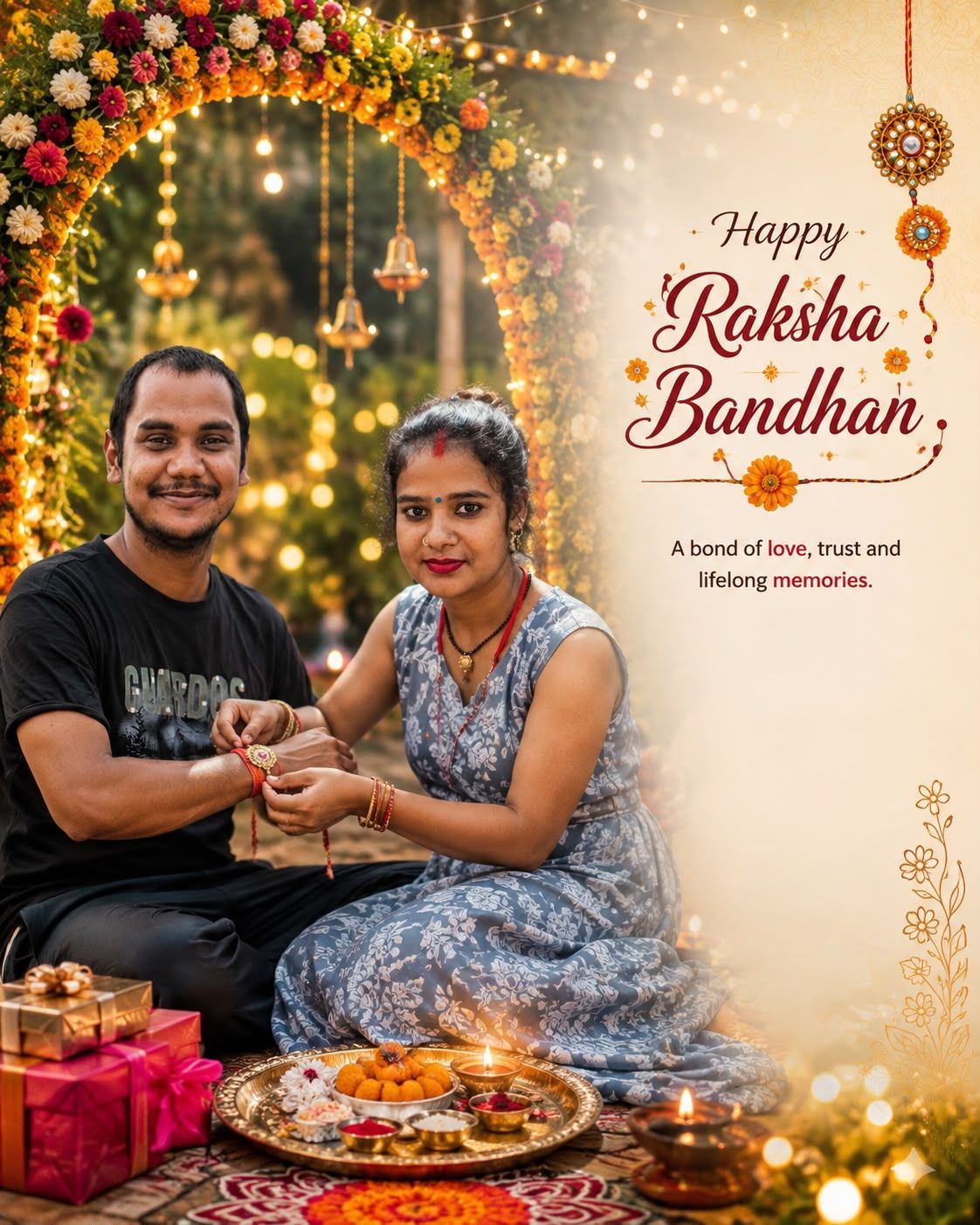
✨ AI Image Prompt
# Festive Garden Rakshabandhan Poster
Create a unique ultra-realistic vertical 4:5 Rakshabandhan poster set in a beautiful festive Indian garden using the UPLOADED PHOTO(S).
PHOTO HANDLING:
If TWO photos are uploaded:
Photo 1 = BROTHER.
Photo 2 = SISTER.
Use both uploaded identities and exactly TWO people.
If ONLY ONE photo is uploaded:
Treat the uploaded person as the SISTER.
Create a SOLO festive portrait containing exactly ONE human.
Never automatically create a brother.
IDENTITY PRESERVATION:
Preserve exact facial identity, face shape, eyes, eyebrows, nose, lips, skin tone, hairstyle and recognizable natural features.
BACKGROUND:
Create an elegant evening garden decorated for Rakshabandhan with strings of warm fairy lights, marigold flowers, floral arches, hanging diyas, beautiful rangoli and subtle golden bokeh.
TWO-PHOTO COMPOSITION:
Show brother and sister sitting beneath a floral arch. The sister lovingly ties rakhi on the brother’s wrist while both smile naturally. Add a decorated thali, Indian sweets and gifts in the foreground.
ONE-PHOTO COMPOSITION:
Show ONLY the sister beneath the floral arch holding an ornate rakhi thali and smiling naturally. No second person, hidden human, background crowd, reflection or silhouette.
POSTER LAYOUT:
Use cinematic subject placement on one side and leave a beautiful clean area on the other side for festive typography.
Include decorative rakhi and floral graphic elements.
MOOD:
Warm, joyful, emotional and premium, with natural sibling-festival atmosphere.
STYLE:
Ultra-realistic professional photography, cinematic evening lighting, 85mm lens look, natural skin texture, beautiful bokeh, premium Indian festival advertising poster, crisp details, 4K.
STRICT RULE:
1 PHOTO = 1 HUMAN ONLY.
2 PHOTOS = 2 HUMANS ONLY.
Never generate extra people.
NEGATIVE:
extra person, automatically generated brother, duplicate subject, face swapping, identity loss, malformed hands, extra fingers, unnatural expressions, blurry image, low detail, watermark, overcrowded layout.
रक्षाबंधन की AI फोटो कैसे बनाएं? – Step by Step
स्टेप 1: AI वेबसाइट खोलें
सबसे पहले नीचे दिए गए किसी एक AI टूल को खोलें:
ChatGPT:
https://chatgpt.com/
Google Gemini:
https://gemini.google.com/
स्टेप 2: अपनी फोटो अपलोड करें
आप 1 या 2 फोटो अपलोड कर सकते हैं।
अगर 2 फोटो अपलोड कर रहे हैं:
- पहली फोटो = भाई की
- दूसरी फोटो = बहन की
AI दोनों फोटो का इस्तेमाल करके भाई-बहन का सुंदर रक्षाबंधन पोस्टर बनाएगा।
अगर केवल 1 फोटो अपलोड कर रहे हैं:
सिर्फ बहन की फोटो अपलोड करें।
इस स्थिति में AI केवल बहन की एक ही फोटो वाला रक्षाबंधन पोस्टर बनाएगा। कोई भाई या दूसरा व्यक्ति अपने आप नहीं जोड़ा जाएगा।
स्टेप 3: पसंदीदा Prompt कॉपी करें
हमारी वेबसाइट पर दिए गए 5 अलग-अलग रक्षाबंधन AI Prompts में से अपना पसंदीदा डिजाइन चुनें।
जैसे:
- Royal Traditional Design
- Cream Floral Design
- Modern Trending Design
- Royal Palace Design
- Festive Garden Design
पसंद आने वाले Prompt को पूरा Copy कर लें।
स्टेप 4: Prompt को Paste करें
फोटो अपलोड करने के बाद कॉपी किए गए Prompt को ChatGPT या Gemini के मैसेज बॉक्स में Paste करें।
इसके बाद Send / Generate पर क्लिक करें।
स्टेप 5: AI आपकी फोटो बनाएगा
अब AI आपकी अपलोड की गई फोटो और Prompt के अनुसार रक्षाबंधन का शानदार पोस्टर तैयार करेगा।
2 फोटो दी हैं → भाई-बहन का पोस्टर बनेगा।
सिर्फ बहन की 1 फोटो दी है → केवल बहन का Solo रक्षाबंधन पोस्टर बनेगा।
स्टेप 6: बनी हुई फोटो को ध्यान से देखें
फोटो बनने के बाद इन चीजों को जरूर चेक करें:
- चेहरा आपकी असली फोटो जैसा है या नहीं
- कोई अतिरिक्त व्यक्ति तो नहीं आ गया
- हाथ और उंगलियां सही बनी हैं या नहीं
- राखी और पूजा की थाली सही दिख रही है या नहीं
- कपड़े और बैकग्राउंड अच्छे हैं या नहीं
अगर चेहरा सही न बने तो AI को लिखें:
“अपलोड की गई फोटो का चेहरा बिल्कुल वैसा ही रखें और दोबारा बनाएं। कोई अतिरिक्त व्यक्ति न जोड़ें।”
स्टेप 7: दूसरा डिजाइन भी बनाएं
अगर पहला डिजाइन पसंद नहीं आता है, तो वेबसाइट से दूसरा Prompt कॉपी करें।
उसी फोटो को लगाकर आप अलग-अलग स्टाइल में कई शानदार Raksha Bandhan AI Photos बना सकते हैं।
स्टेप 8: तैयार फोटो सेव करें
फोटो पसंद आने के बाद उसे अपने मोबाइल या कंप्यूटर में सेव कर लें।
फिर आप इसे:
- WhatsApp Status
- Profile Photo
- Festival Poster
- Raksha Bandhan Greeting
के रूप में इस्तेमाल कर सकते हैं।
जरूरी सुझाव
बेहतरीन रिजल्ट के लिए साफ, अच्छी रोशनी वाली और सामने से ली गई फोटो अपलोड करें। बहुत धुंधली, अंधेरी या दूर से ली गई फोटो में चेहरा सही बनने की संभावना कम हो सकती है।
