
- Your cart is empty
- Continue Shopping
Rainy Double Exposure AI Portrait Prompt | Face Lock | 12K
- ai prompt, Blog
- Posted on
-
by GraphicsMart
- 0 comments
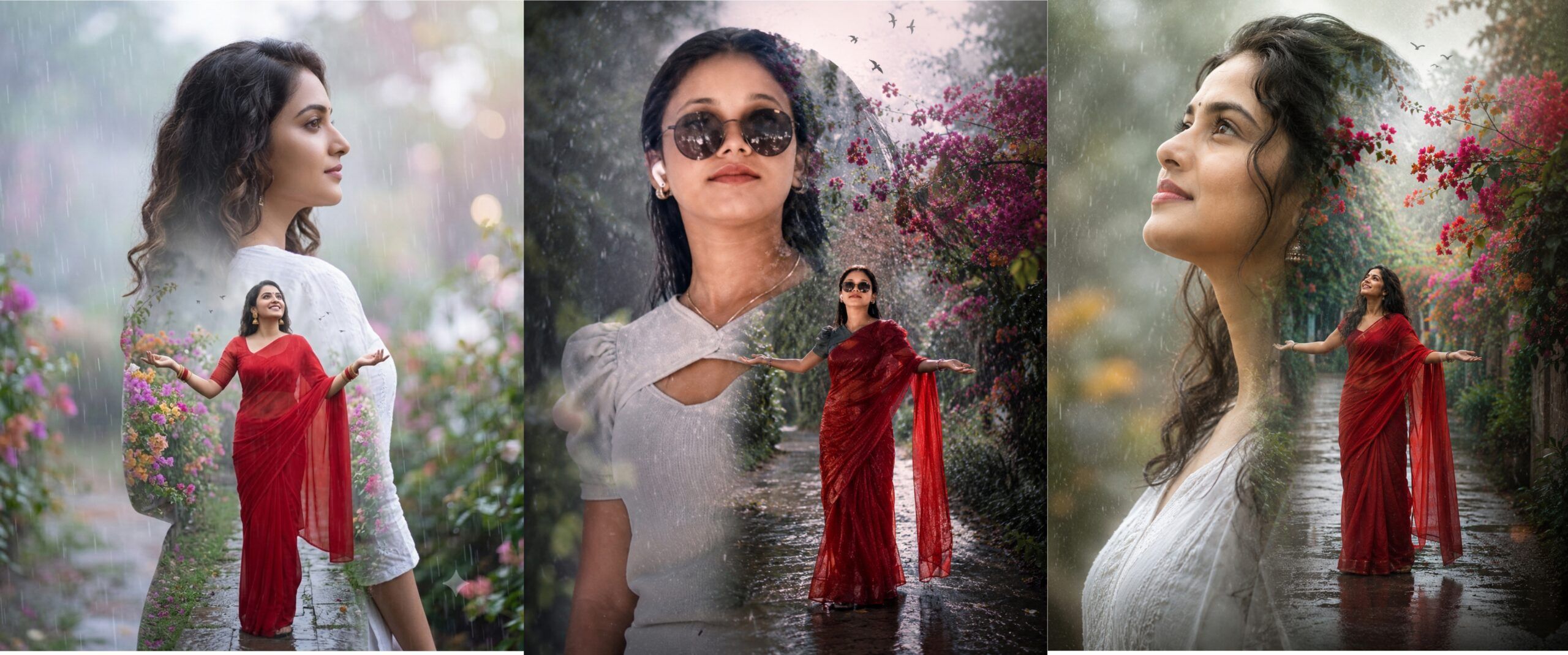
Cinematic Rain Double Exposure Portrait AI Prompt | 12K HD
Product Description
Bring your imagination to life with this professionally designed Rainy Cinematic Double Exposure AI Portrait Prompt. This premium prompt allows anyone to transform a simple uploaded photo into a breathtaking double exposure masterpiece while keeping the person’s original face and identity intact.
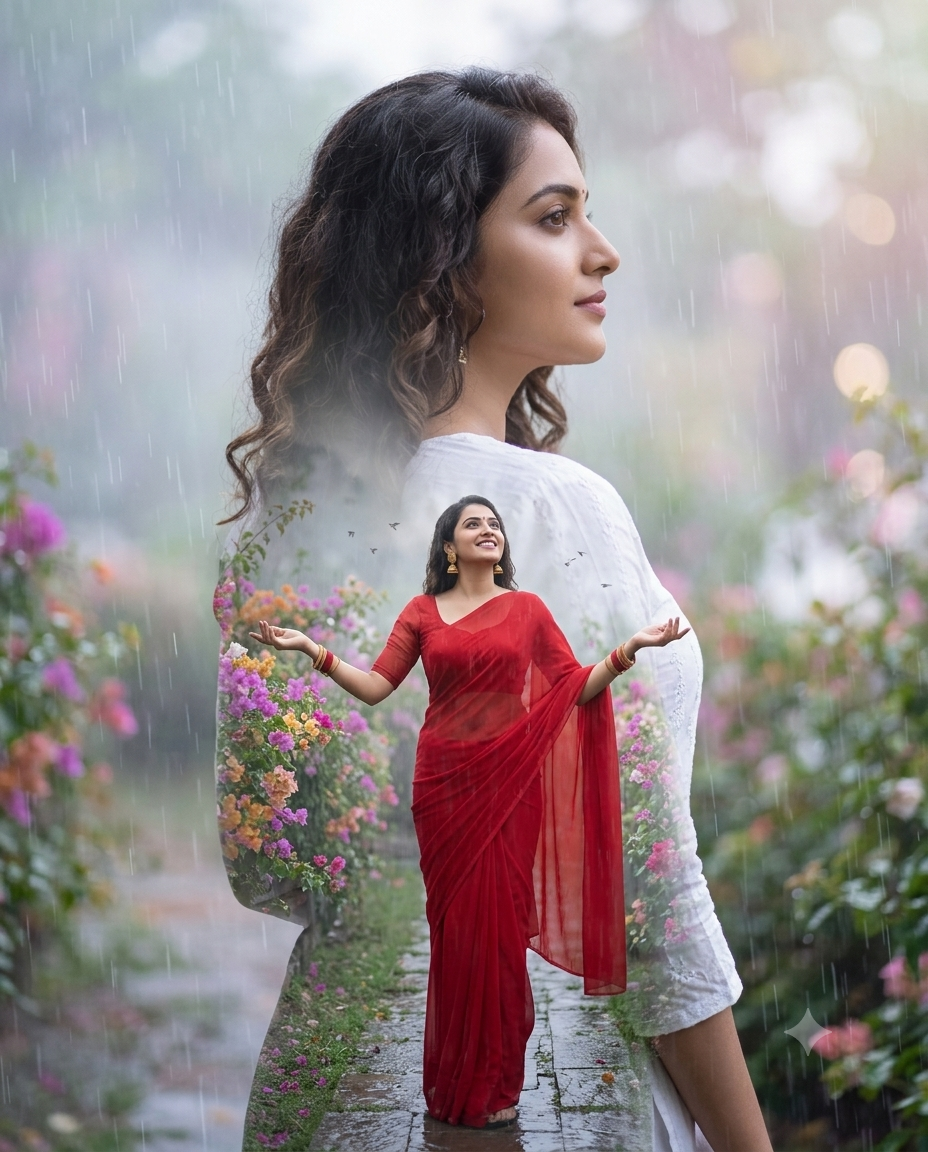
The composition features a large cinematic close-up portrait blended with a full-body scene inside the silhouette. The character stands gracefully in a rain-soaked garden surrounded by vibrant bougainvillea flowers, gentle rainfall, mist, lush greenery, and a reflective wet pathway. The soft pastel atmosphere combined with realistic rain textures creates an emotional and artistic portrait perfect for social media, professional portfolios, wallpapers, and creative projects.
This prompt includes an advanced Face Lock Instruction that helps maintain the original facial identity, hairstyle, skin tone, facial proportions, and expression from the uploaded photo. It also contains a powerful built-in Negative Prompt to reduce face swapping, blurry results, extra limbs, distorted anatomy, text, logos, watermarks, and other common AI image generation issues.
Designed for beginners and professionals alike, this prompt works with AI image generators that support photo uploads and reference images. Simply upload your own photo, paste the prompt, and generate a cinematic portrait in just a few clicks.
Whether you are creating artistic portraits, Instagram content, profile pictures, digital artwork, or premium client projects, this prompt delivers realistic lighting, cinematic depth, HDR quality, and a luxurious editorial finish in ultra-high resolution.
Features
- Premium Rainy Double Exposure Style
- Exact Face Lock Instructions
- Built-in Negative Prompt
- Hyper Realistic 12K Output
- Cinematic Rain Garden Background
- Bougainvillea Flower Theme
- HDR Photography Style
- DSLR Quality Look
- One Click Copy & Paste Prompt
- Beginner Friendly
- Works with Photo Upload
- Premium Fashion Editorial Style
✨ AI Image Prompt
Create a premium cinematic double exposure portrait using the uploaded photo as the ONLY face reference.
IMPORTANT FACE LOCK:
Preserve the person’s original face exactly as uploaded. Maintain 100% identical facial identity, hairstyle, forehead, eyebrows, eyes, nose, lips, jawline, ears, skin tone, facial proportions, age, expression, and overall identity. Do NOT beautify, replace, modify, generate, or swap the face. Keep the exact same facial features and identity from the uploaded image.
Create an elegant young Indian woman with natural loose hair, wearing stylish black round sunglasses, wireless earbuds, a simple white cotton kurti with soft fabric texture, delicate silver necklace, elegant earrings, minimal makeup, and a calm, peaceful expression.
Create a premium artistic cinematic double exposure composition.
LEFT SIDE:
A large ultra-detailed close-up portrait of the same woman wearing sunglasses, softly looking upward toward the falling rain with a peaceful smile. The portrait should dominate the composition with realistic skin texture and cinematic lighting.
INSIDE THE SILHOUETTE:
Inside the large portrait silhouette, place the same woman standing in a beautiful rain-soaked garden. She is wearing a flowing transparent red chiffon saree with matching blouse, elegant earrings, bangles, and subtle traditional styling. She stands on a narrow wet pathway with both hands spread wide, face looking toward the sky, smiling while enjoying the rain.
BACKGROUND INSIDE:
A dreamy botanical garden filled with vibrant pink, red, orange, and purple bougainvillea flowers covered with fresh rain droplets, lush green leaves, soft fog, tiny flying birds, gentle drizzle, wet reflective pathway, romantic monsoon atmosphere.
OUTER BACKGROUND:
Soft faded mist, rainfall textures, dreamy pastel color grading, cinematic fog, smooth bokeh lights, soft depth of field, realistic rain streaks, HDR lighting, premium luxury editorial atmosphere.
Photography Style:
Premium fashion editorial photography, cinematic double exposure art, DSLR quality, 85mm portrait lens, HDR, ultra realistic skin texture, crystal clear facial details, shallow depth of field, volumetric lighting, realistic reflections, premium color grading, hyper realistic, photorealistic, masterpiece, ultra sharp focus, 12K resolution.
Aspect Ratio: 4:5
No text.
No logo.
No watermark.
Negative Prompt:
different face, face swap, changed identity, face replacement, wrong face, altered facial features, cartoon, anime, illustration, painting, CGI, doll face, plastic skin, oversmooth skin, unrealistic beauty, blur, low quality, low resolution, pixelated, noisy image, duplicate face, extra face, multiple people, cropped body, missing hands, extra fingers, bad hands, bad anatomy, deformed body, distorted eyes, crossed eyes, asymmetrical face, incorrect hairstyle, extra earrings, duplicate accessories, unrealistic rain, fake flowers, oversaturated colors, watermark, logo, signature, text, frame, border, jpeg artifacts, overexposed, underexposed.
How to Create Your Image (Step by Step)
Step 1 – Copy the Prompt
इस पेज पर दिया गया पूरा AI Prompt (Main Prompt + Negative Prompt) कॉपी करें।
Step 2 – Open an AI Image Generator
किसी ऐसे AI Image Generator को खोलें जो Photo Upload / Image Reference सपोर्ट करता हो।
Step 3 – Upload Your Photo
Upload Image या Add Reference Photo पर क्लिक करें और अपनी फोटो अपलोड करें।
Best Photo Requirements
- Front Face Photo
- HD / High Quality
- Good Lighting
- Only One Person
- Face Clearly Visible
- No Blur Original Photo
Step 4 – Paste the Prompt
कॉपी किया हुआ पूरा Prompt Prompt Box में पेस्ट करें।
महत्वपूर्ण: Main Prompt और Negative Prompt दोनों एक साथ ही पेस्ट करें।
Step 5 – Enable Face Reference
यदि AI Tool में नीचे दिए गए विकल्प हों, तो उन्हें ON करें।
- Face Reference
- Character Reference
- Identity Lock
- Face Lock
- Reference Strength
यदि Reference Strength का विकल्प मिले तो उसे 80–100% रखें।
Step 6 – Upload Quality Settings
यदि उपलब्ध हों, तो ये सेटिंग्स चुनें:
- Aspect Ratio : 4:5
- Quality : High
- Resolution : HD / Ultra HD
- Style : Photorealistic
- CFG / Prompt Strength : High
Step 7 – Click Generate
अब Generate या Create बटन पर क्लिक करें।
AI कुछ सेकंड में आपकी इमेज तैयार कर देगा।
Step 8 – Download Your Image
जब रिज़ल्ट पसंद आ जाए, तो HD या Highest Quality में डाउनलोड करें।
Tips for Best Results
- हमेशा High Quality फोटो का उपयोग करें।
- अच्छी रोशनी वाली फोटो बेहतर रिज़ल्ट देती है।
- फोटो में केवल एक ही व्यक्ति होना चाहिए।
- चेहरा कैमरे की ओर होना चाहिए।
- Blur, Dark या Low Quality फोटो का उपयोग न करें।
- यदि पहला रिज़ल्ट पसंद न आए, तो दोबारा Generate करें।
Important Note
यह Prompt Face Lock के साथ बनाया गया है ताकि आपकी मूल पहचान (चेहरा, हेयरस्टाइल और चेहरे की विशेषताएँ) यथासंभव सुरक्षित रहे। हालांकि, अलग-अलग AI Image Generators के मॉडल और सेटिंग्स के अनुसार परिणाम थोड़ा अलग हो सकता है। सर्वोत्तम परिणाम के लिए साफ, हाई-क्वालिटी फोटो का उपयोग करें और यदि उपलब्ध हो तो Face Reference या Identity Lock विकल्प को सक्षम रखें।
