- Your cart is empty
- Continue Shopping
AI से Printing Shop की कमाई कैसे बढ़ाएं? 15 Practical तरीके 2026
- Blog
- Posted on
-
by GraphicsMart
- 0 comments
AI से Printing Shop की कमाई कैसे बढ़ाएं? 15 Practical तरीके – Printing Business AI Guide 2026
आज AI केवल फोटो बनाने या सवालों के जवाब देने तक सीमित नहीं है। अगर आप Printing Shop, Graphics Designing, Flex Printing, Wedding Card Designing, Photo Editing या Online Designing का काम करते हैं, तो AI आपके रोज के कई कामों को आसान बना सकता है।
लेकिन इसका मतलब यह नहीं है कि AI आपके बदले पूरा काम कर देगा। Printing के काम में सही size, spelling, color, resolution, bleed और final proof जैसी चीजें अभी भी designer को खुद check करनी पड़ती हैं।
इस guide में हम केवल AI tools की list नहीं देंगे। हम practical तरीके से समझेंगे कि एक printing shop में customer की requirement मिलने से लेकर final print तैयार होने तक AI कहाँ उपयोगी हो सकता है।
लेखक: Satyam Rao – GraphicsMart
Printing Shop में AI का सही इस्तेमाल क्या है?
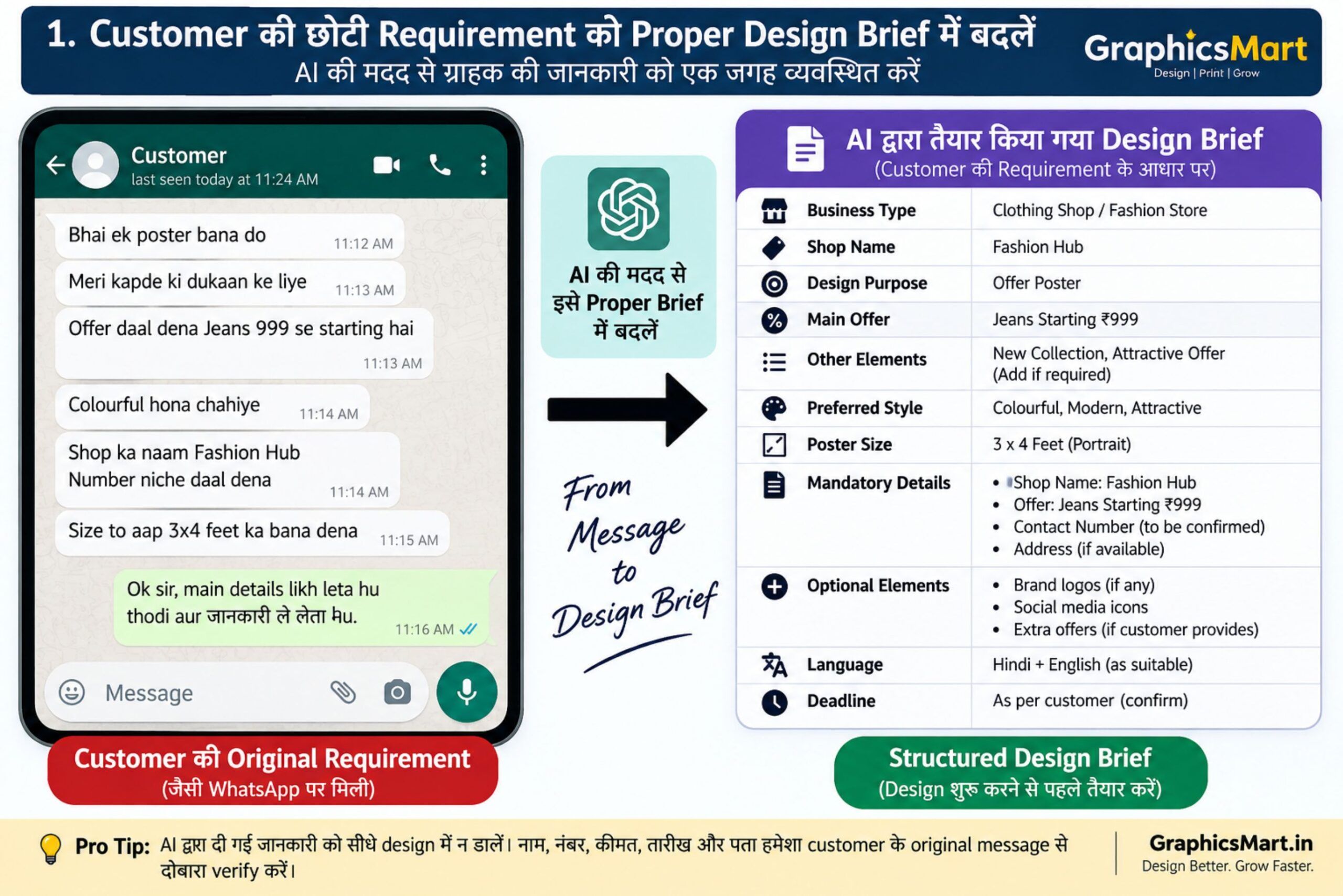
मान लीजिए किसी ग्राहक ने WhatsApp पर सिर्फ इतना लिखा:
“मेरी कपड़े की दुकान के लिए ऑफर वाला पोस्टर बना दीजिए। Jeans ₹999 से शुरू है।”
पहले designer को heading, offer line, background idea और पूरा layout खुद सोचना पड़ता था।
अब AI से आप शुरुआती content और design concept जल्दी तैयार कर सकते हैं। उसके बाद CorelDRAW जैसे designing software में size, text, logo, contact details और print settings को manually final किया जा सकता है।
यही AI का सबसे उपयोगी तरीका है—AI से काम शुरू करवाइए, लेकिन final checking designer खुद करे।
1. Customer की छोटी Requirement को Proper Design Brief में बदलें
Printing shop पर कई ग्राहक पूरी जानकारी नहीं देते।
उदाहरण:
“एक opening poster बना दो।”
ऐसी requirement को AI की मदद से structured किया जा सकता है:
- दुकान का नाम
- Opening date
- मुख्य service
- Offer
- Address
- Mobile number
- Poster size
- पसंदीदा style
इससे design शुरू करने से पहले जरूरी जानकारी एक जगह मिल जाती है।
Practical Tip
AI द्वारा बनाई गई information को सीधे poster में न डालें। ग्राहक द्वारा दिए गए नाम, तारीख, मोबाइल नंबर, कीमत और address को original message से दोबारा verify करें।
2. Poster और Banner के लिए Heading तैयार करें
हर poster में केवल design अच्छा होना काफी नहीं है। Heading ऐसी होनी चाहिए जिसे दूर से भी आसानी से पढ़ा जा सके।
उदाहरण के लिए कपड़े की दुकान के poster में AI से अलग-अलग heading ideas लिए जा सकते हैं:
Grand Fashion Sale
नई Collection, शानदार Offer
आज ही खरीदें – Limited Time Offer
फिर इनमें से customer के business और poster size के अनुसार suitable heading चुनी जा सकती है।

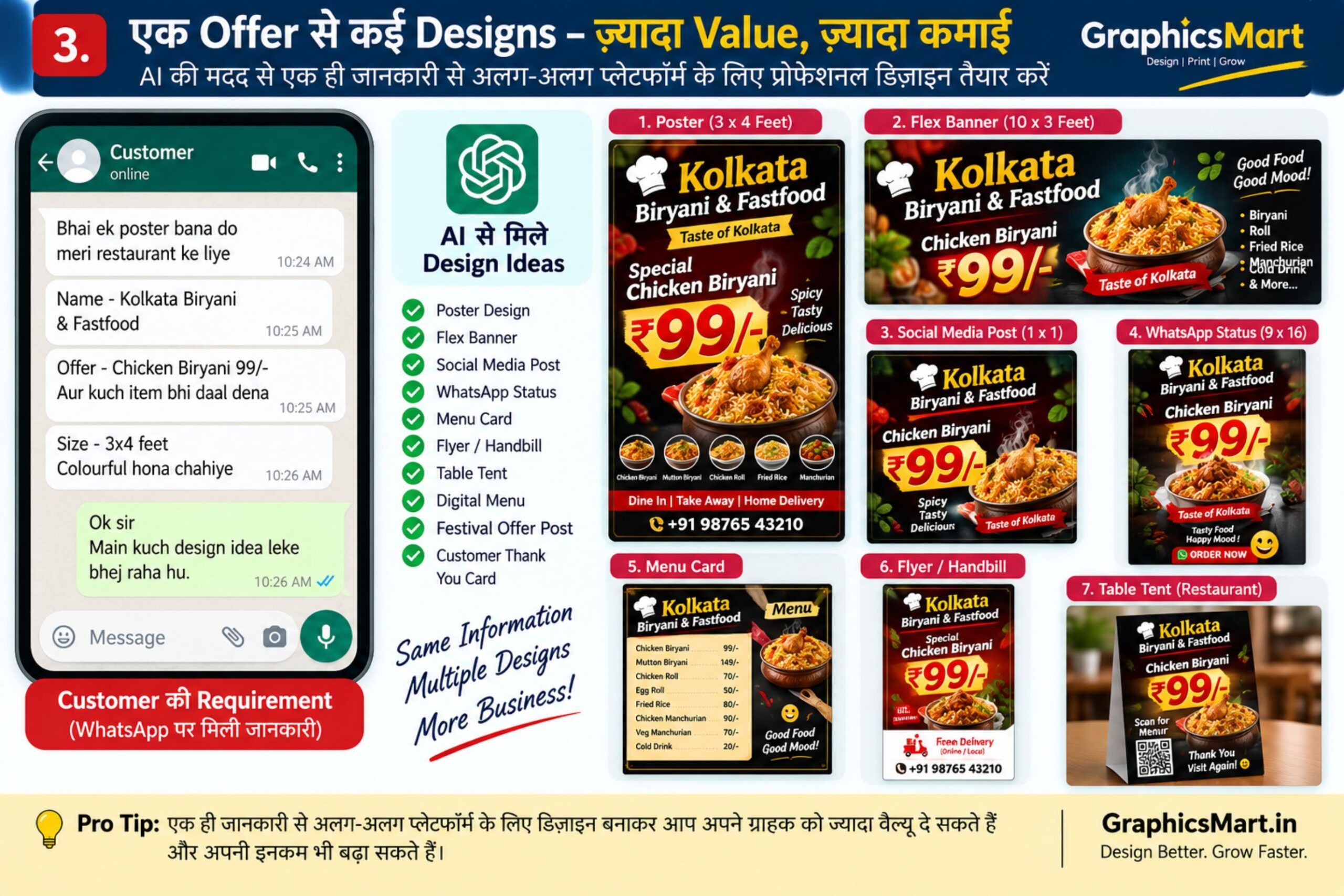
3. एक ही Offer के अलग-अलग Advertisement तैयार करें
मान लीजिए किसी दुकान का offer है:
2 Shirts केवल ₹799
इसी एक offer से अलग-अलग content बनाया जा सकता है:
- Flex banner
- WhatsApp Status
- Instagram post
- Facebook post
- Shop counter poster
- Promotional message
इससे एक customer को केवल एक poster देने के बजाय पूरा promotional design package offer किया जा सकता है।
4. Wedding Card Design के लिए Creative Concepts लें
Wedding card designing में बार-बार नया layout सोचना मुश्किल हो सकता है।
AI की मदद से theme ideas लिए जा सकते हैं, जैसे:
- Royal Indian Wedding
- Floral Wedding
- Traditional Red & Gold
- Minimal Cream Wedding
- Radha-Krishna Theme
- Modern Pastel Invitation
इसके बाद final card CorelDRAW में ग्राहक की सही details के साथ तैयार किया जा सकता है।
जरूरी सावधानी
AI-generated wedding card image में लिखे हुए Hindi text पर भरोसा न करें। नाम, तारीख, स्थान और कार्यक्रम का text CorelDRAW में manually type करना ज्यादा सुरक्षित है।
5. Visiting Card के Multiple Layout Ideas बनाएं
एक customer को एक ही visiting card design दिखाने के बजाय AI से अलग-अलग visual concepts लिए जा सकते हैं।
उदाहरण:
- Minimal business card
- Premium dark card
- Corporate card
- Modern gradient card
- Traditional Indian business card
इन concepts को reference की तरह इस्तेमाल करके final vector design तैयार किया जा सकता है।
6. Product Advertisement के लिए Background तैयार करें
कई बार customer product की photo भेज देता है लेकिन उसका background अच्छा नहीं होता।
AI से product के अनुसार background concept बनाया जा सकता है।
उदाहरण के लिए:
Restaurant → food-themed background
Jewellery → premium luxury background
Electronics → modern technology background
Fashion → studio/fashion background
लेकिन actual product की shape, color और branding बदलने से बचना चाहिए, खासकर जब poster commercial advertisement के लिए हो।
7. Festival Posters जल्दी तैयार करें
Printing shops में त्योहारों के समय अचानक बहुत ज्यादा poster orders आ सकते हैं।
जैसे:
- Diwali
- Holi
- Dussehra
- Vishwakarma Puja
- Janmashtami
- Independence Day
- New Year
AI से festival के लिए background या creative concept तैयार करके उसमें customer का वास्तविक logo, नाम, photo और contact details manually जोड़े जा सकते हैं।
इससे हर customer को बिल्कुल एक जैसा template देने की जरूरत कम हो सकती है।
8. पुराने या खराब Photo को Design के लिए तैयार करें
कई customers WhatsApp से compressed या पुरानी photo भेजते हैं।
AI-based photo enhancement tools कुछ मामलों में:
- noise कम करने,
- image sharpen करने,
- background साफ करने,
- और photo को visually clearer बनाने
में मदद कर सकते हैं।
लेकिन AI enhancement से चेहरे के छोटे details बदल भी सकते हैं। इसलिए पहचान से जुड़ी photo में original और enhanced image को side-by-side check करना जरूरी है।
9. Background Removal में समय बचाएं
Poster designing में व्यक्ति या product का background हटाना common काम है।
AI background removal से शुरुआती cutout जल्दी मिल सकता है।
लेकिन final print से पहले खास तौर पर इन areas को zoom करके देखें:
- Hair
- Fingers
- Clothes edges
- Transparent objects
- Jewellery
- Product edges
Automatic background removal हमेशा perfect नहीं होता।
10. Social Media Content भी Customer को दें
अगर आपने customer के लिए दुकान का poster बनाया है, तो उसी design के साथ social media content भी दिया जा सकता है।
उदाहरण:
Instagram Caption:
नई Collection अब उपलब्ध है। आज ही हमारी दुकान पर आएं और latest designs देखें।
इसके साथ relevant hashtags और short WhatsApp promotional message भी बनाया जा सकता है।
इस तरह printing customer को digital promotion service भी offer की जा सकती है।
11. Menu और Rate List का Content व्यवस्थित करें
Restaurant, salon, coaching center और service shops अक्सर handwritten या WhatsApp पर rate list भेजते हैं।
AI उस raw information को categories में organize करने में मदद कर सकता है।
उदाहरण:
Fast Food
Burger
Chowmein
Manchurian
Beverages
Tea
Coffee
Cold Drink
लेकिन prices AI से generate नहीं करवाने चाहिए। Final rate वही रखें जो customer ने दिया है।
12. Hindi Text को बेहतर और साफ बनाएं
कई customers poster के लिए बहुत सामान्य Hindi line देते हैं।
जैसे:
“हमारे यहां सभी प्रकार के कार्ड बनते हैं।”
इसे advertisement के लिए थोड़ा बेहतर बनाया जा सकता है:
“यहाँ शादी, जन्मदिन एवं अन्य शुभ अवसरों के लिए आकर्षक कार्ड डिजाइन एवं प्रिंट किए जाते हैं।”
AI grammar और wording सुधारने में उपयोगी है, लेकिन local नाम और address की spelling manually verify करें।
13. AI से Logo Idea लें, Final Logo खुद बनाएं
नई दुकान के customer को कई बार पता ही नहीं होता कि logo कैसा होना चाहिए।
ऐसे में AI से शुरुआती concept लिया जा सकता है।
उदाहरण:
“SR Fashion” के लिए:
- SR monogram
- Clothing icon
- Minimal typography
- Premium badge concept
लेकिन AI image को सीधे professional logo file मान लेना सही नहीं है।
Final logo को CorelDRAW में clean vector curves के रूप में तैयार करना बेहतर रहता है ताकि उसे visiting card से लेकर बड़े flex तक इस्तेमाल किया जा सके।
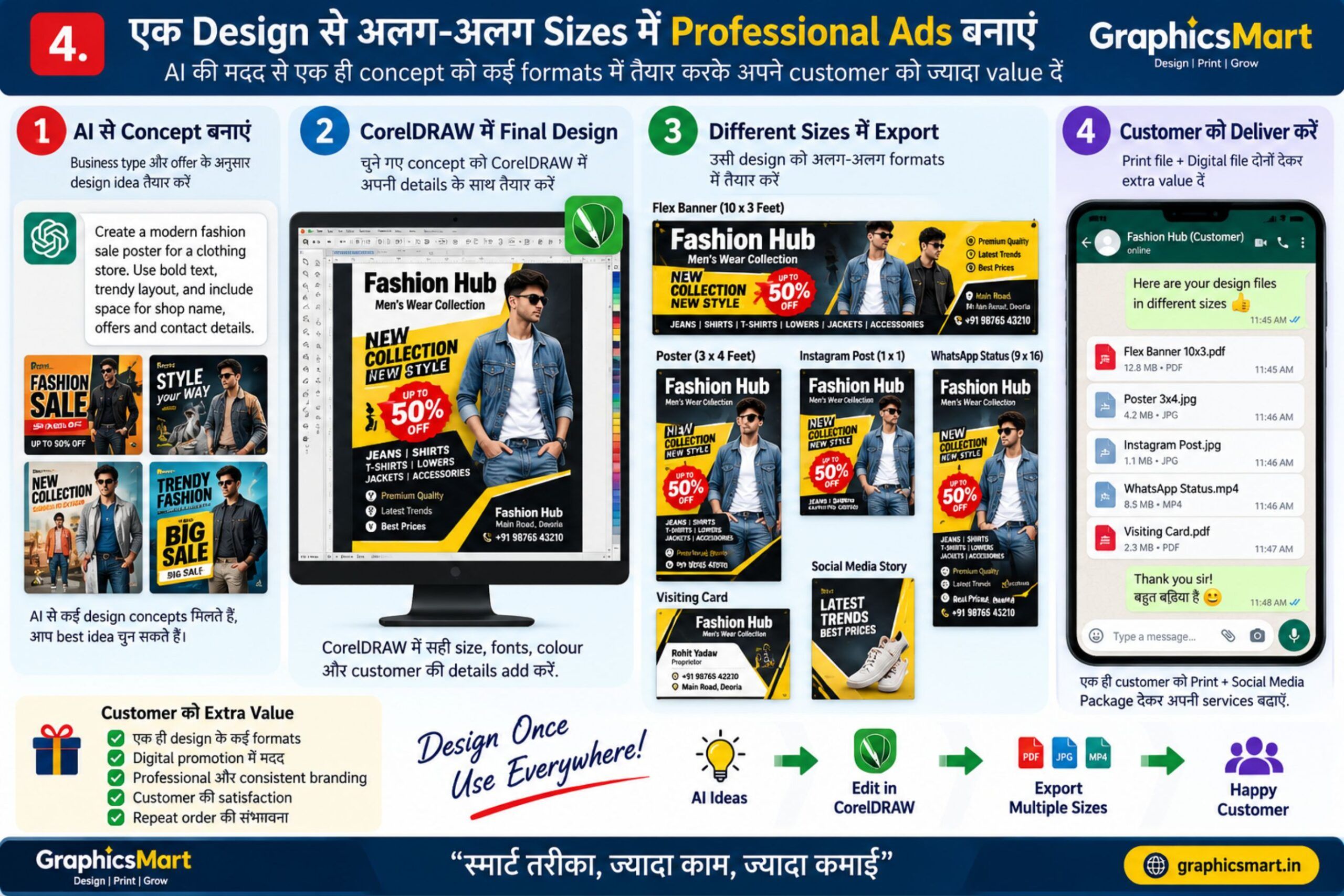
14. एक Design को अलग-अलग Sizes में तैयार करें
आज customer को केवल flex नहीं चाहिए।
एक ही promotion के लिए उसे चाहिए हो सकता है:
- 9:16 WhatsApp Status
- Square social post
- Portrait poster
- Landscape flex
- Visiting-card-size offer coupon
AI concept बनाने में मदद कर सकता है, लेकिन केवल image को stretch करके size बदलना सही तरीका नहीं है।
हर format में text और important elements को दोबारा arrange करना चाहिए।
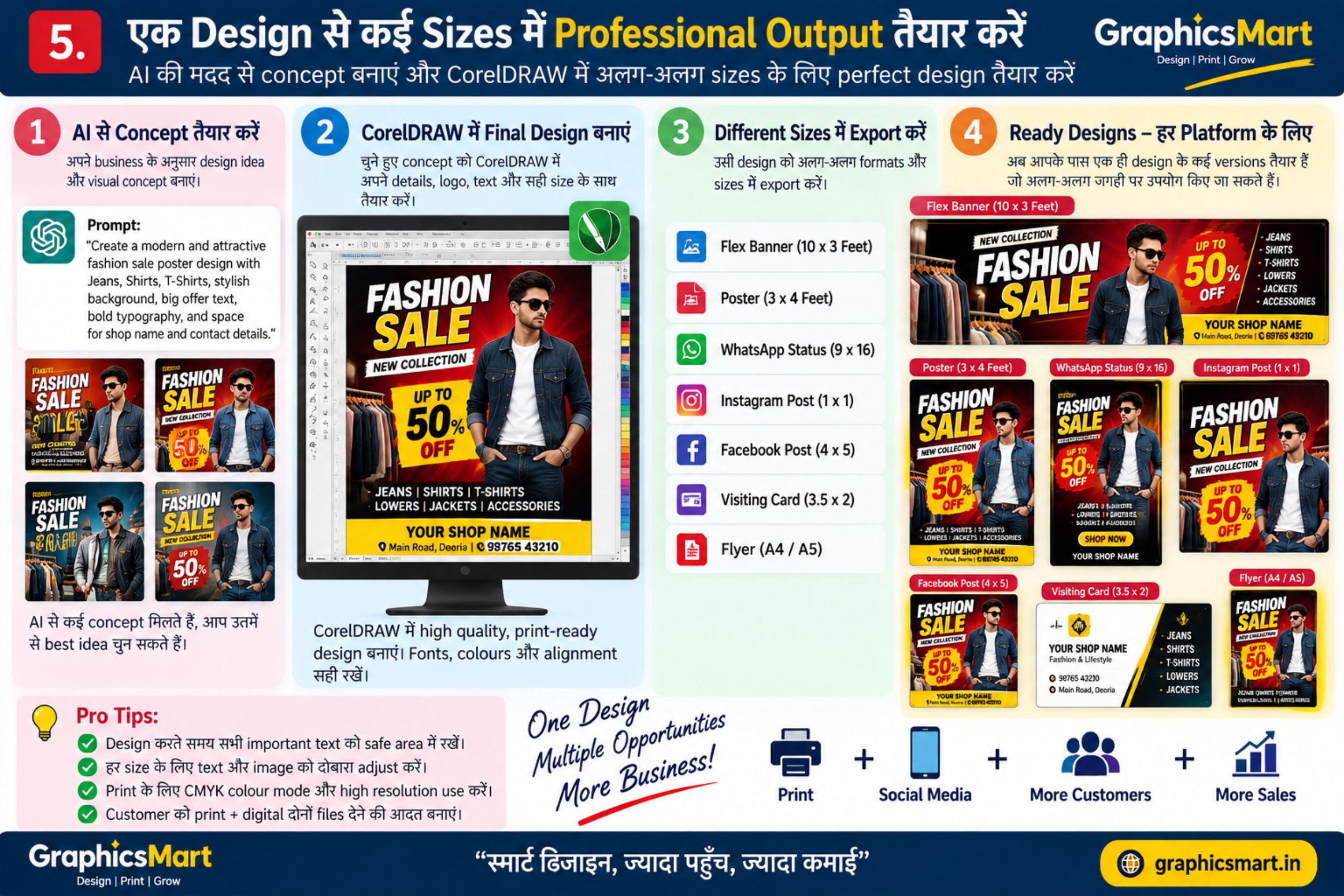
15. Customer को Extra Digital Service Offer करें
AI का सबसे बड़ा business फायदा केवल जल्दी design बनाना नहीं है।
आप existing printing customer को additional services दे सकते हैं:
- Social media poster
- WhatsApp status design
- Product promotional image
- Festival creative
- Caption writing
- Promotional text
- AI photo creative
- Digital invitation
इससे traditional printing और digital designing दोनों services एक साथ दी जा सकती हैं।
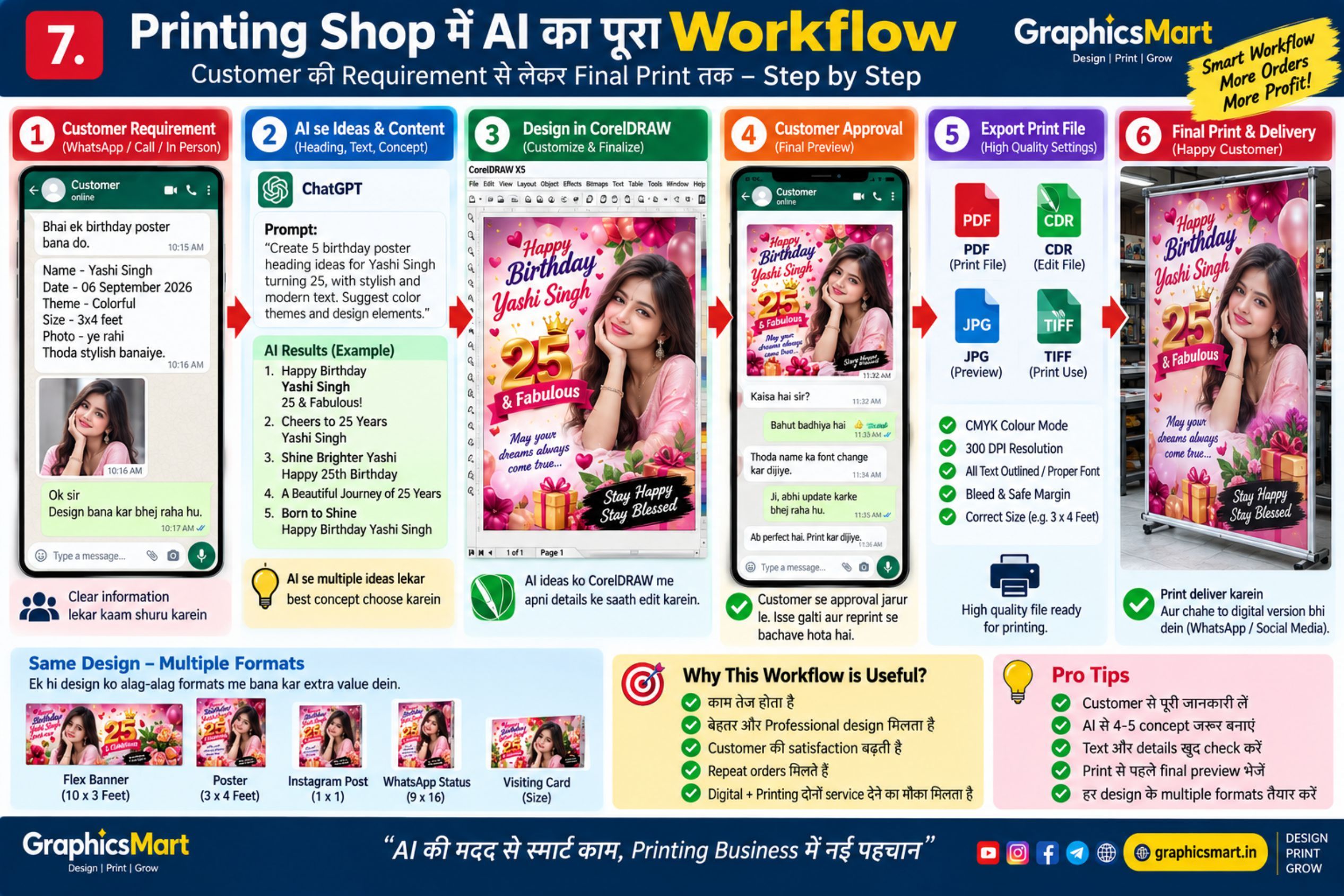
Practical Example: Customer से Final Print तक पूरा Workflow
अब एक practical example देखते हैं।
मान लीजिए customer कपड़े की दुकान का poster बनवाने आया।
उसने जानकारी दी:
Shop Name: Example Fashion
Offer: Jeans Starting ₹999
Contact: Customer का मोबाइल नंबर
Requirement: दुकान के बाहर लगाने के लिए poster
Step 1 – Requirement Check
सबसे पहले shop name, offer, contact और poster size confirm करें।
Step 2 – AI से Content Ideas
AI से 4–5 heading और promotional lines तैयार करवाएं।
Step 3 – Visual Concept
Fashion advertisement के लिए suitable background/layout concept तैयार करें।
Step 4 – CorelDRAW में Final Design
अब सही dimensions के document में customer की actual details डालें।
Step 5 – Proof Checking
Print से पहले check करें:
- Shop name
- Mobile number
- Price
- Hindi/English spelling
- Image quality
- Alignment
- Print size
Step 6 – Customer Approval
Final print निकालने से पहले JPEG/PDF preview customer को भेजकर approval लेना उपयोगी रहता है।
Step 7 – Print और Digital Version
Print file के साथ जरूरत के अनुसार WhatsApp Status या social media version भी तैयार किया जा सकता है।
AI इस्तेमाल करते समय Printing Shop वालों की 7 Common Mistakes
AI काम तेज कर सकता है, लेकिन गलत इस्तेमाल से printing में नुकसान भी हो सकता है।
1. AI-generated text को बिना पढ़े print करना
AI spelling या details गलत कर सकता है।
2. Customer का mobile number verify न करना
एक digit गलत होने पर पूरा print बेकार हो सकता है।
3. AI image में लिखे text पर भरोसा करना
Image generators अभी भी text में गलतियाँ कर सकते हैं।
4. Low-resolution image को बड़ा flex बना देना
Screen पर अच्छी दिखने वाली image जरूरी नहीं कि बड़े print में भी साफ निकले।
5. RGB/CMYK workflow को ignore करना
Printer और printing process के अनुसार color output अलग हो सकता है।
6. AI को पूरा designer समझ लेना
AI concept दे सकता है; professional finishing के लिए human checking जरूरी है।
7. Customer approval के बिना print करना
नाम, तारीख, rate और contact जैसी details final approval के बाद ही print करें।
क्या AI आने से Graphic Designer का काम खत्म हो जाएगा?
AI designing workflow को बदल रहा है, लेकिन printing business में केवल attractive image बनाना ही काम नहीं है।
Customer की requirement समझना, सही dimensions बनाना, typography set करना, local-language spelling check करना, print material समझना, colors manage करना और final output verify करना अभी भी practical skills हैं।
इसलिए AI को designer के replacement की जगह productivity tool की तरह इस्तेमाल करना ज्यादा उपयोगी है।
Printing Shop में AI इस्तेमाल करने का सबसे अच्छा तरीका
एक simple workflow याद रखें:
Customer Requirement → AI Assistance → Human Editing → Proof Checking → Customer Approval → Final Print
इस workflow में AI speed देता है और designer accuracy तथा finishing संभालता है।
Frequently Asked Questions (FAQ)
क्या AI से पूरा poster बनाया जा सकता है?
AI poster concept और image तैयार कर सकता है, लेकिन commercial printing से पहले text, dimensions, spelling, resolution और customer details manually check करनी चाहिए।
क्या AI से बनाई गई image flex में print कर सकते हैं?
कर सकते हैं, लेकिन पहले image का actual resolution और intended print size check करें। केवल screen पर साफ दिखाई देना पर्याप्त नहीं है।
क्या AI Hindi text सही लिखता है?
AI text tools Hindi अच्छी तरह लिख सकते हैं, लेकिन image-generation tools में Hindi text गलत बन सकता है। महत्वपूर्ण text को designing software में manually type करना बेहतर है।
क्या printing shop में AI सीखना जरूरी है?
जरूरी कहना सही नहीं होगा, लेकिन AI repetitive content, concept generation और शुरुआती design work में समय बचा सकता है। इसका फायदा इस बात पर निर्भर करेगा कि आप इसे अपने existing workflow में कैसे इस्तेमाल करते हैं।
क्या AI से customer की photo edit करना सुरक्षित है?
Customer की permission और privacy का ध्यान रखना चाहिए। महत्वपूर्ण personal photos को किसी online service पर upload करने से पहले उस service की privacy terms भी देखना उचित है।
निष्कर्ष
AI printing shop के लिए केवल “AI Photo बनाने” का tool नहीं है। इसका इस्तेमाल customer requirement organize करने, advertising content तैयार करने, design concepts सोचने, backgrounds बनाने, social-media versions तैयार करने और repetitive काम कम करने में किया जा सकता है।
लेकिन final responsibility designer की रहती है।
किसी भी design को print करने से पहले नाम, मोबाइल नंबर, तारीख, कीमत, spelling, dimensions और image quality जरूर check करें।
अगर आप traditional printing के साथ AI-assisted designing और digital promotional services भी सीखते हैं, तो existing customers को अधिक services देने के नए अवसर बन सकते हैं।
GraphicsMart Design Hub
Practical Graphic Designing, CorelDRAW और AI Design Guides
Website: graphicsmart.in
